
Saludos amigos, hoy os traigo una doble entrada que os será de utilidad si manejáis Cluster Nutanix, especialmente si estáis usando como yo la versión Community, probablemente en producción sea raro apagar una Controladora de Nutanix, pero nunca se sabe:
Credenciales por defecto de un Cluster Nutanix
Lo más normal es que a la hora de desplegar nuestro primer Bloque Nutanix cambiemos estas contraseñas, pero por si acaso estuvierais buscando las credenciales por defecto de una Controladora Nutanix o de un Acropolis Hypervisor, os la dejo aquí en una cómoda tabla:
Apagado y encendido de un Cluster Nutanix
Como so comentaba, es muy improbable que tengáis que realizar estos pasos en producción, pero nunca se sabe y seguramente los uséis más de una vez en vuestros Labs con Nutanix Community, por ejemplo muchos días después que realizo mis Labs sobre Nutanix, apago mi Cluster ya que cada Controladora tiene 16GB de Memoria RAM, pero un apagado de la VM o similar no es un apagado ordenado.
Apagando un Cluster Nutanix
El primero paso que tendremos que hacer es loguearnos a una de las Controladoras en nuestro Cluster, y realizar el comando cluster stop que se encargará de apagar los servicios de Nutanix de manera ordenada, en mi caso podemos ver que lanza el comando a tres controladoras, incluyendo la propia donde me conecté por supuesto:
Nutanix Controller VM
Last login: Wed Nov 16 08:28:30 PST 2016 from 192.168.1.80 on ssh
Last login: Wed Nov 16 08:29:31 2016 from 192.168.1.233
nutanix@NTNX-a032d256-A-CVM:192.168.1.80:~$ cluster stop
2016-11-16 08:29:35 INFO cluster:2168 Executing action stop on SVMs 192.168.1.80,192.168.1.81,192.168.1.82
2016-11-16 08:29:35 INFO cluster:2177
El comando lanzará un output bastante grande donde espera que todos los servicios sean apagados en cada Controladora:
***** CLUSTER NAME *****
Nutanix_Cluster

This operation will stop the Nutanix storage services and any VMs using Nutanix storage will become unavailable. Do you want to proceed? (Y/[N]): y
2016-11-16 08:29:39 INFO zookeeper_session.py:76 Using host_port_list: zk1:9876,zk2:9876,zk3:9876
Waiting on 192.168.1.80 (Up) to stop: Zeus Scavenger SSLTerminator SecureFileSync Medusa DynamicRingChanger Pithos Stargate InsightsDB InsightsDataTransfer Ergon Cerebro Chronos Curator Prism CIM AlertManager Arithmos Acropolis Uhura Snmp SysStatCollector Tunnel ClusterHealth Janus NutanixGuestTools MinervaCVM
Waiting on 192.168.1.81 (Up) to stop: Zeus Scavenger SSLTerminator SecureFileSync Medusa DynamicRingChanger Pithos Stargate InsightsDB InsightsDataTransfer Ergon Cerebro Chronos Curator Prism CIM AlertManager Arithmos Acropolis Uhura Snmp SysStatCollector Tunnel ClusterHealth Janus NutanixGuestTools MinervaCVM
Waiting on 192.168.1.82 (Up, ZeusLeader) to stop: Zeus Scavenger SSLTerminator SecureFileSync Medusa DynamicRingChanger Pithos Stargate InsightsDB InsightsDataTransfer Ergon Cerebro Chronos Curator Prism CIM AlertManager Arithmos Acropolis Uhura Snmp SysStatCollector Tunnel ClusterHealth Janus NutanixGuestTools MinervaCVM
Waiting on 192.168.1.80 (Up) to stop: Zeus Scavenger SSLTerminator SecureFileSync Medusa DynamicRingChanger Pithos Stargate InsightsDB InsightsDataTransfer Ergon Cerebro Chronos Curator Prism CIM AlertManager Arithmos Acropolis Uhura Snmp SysStatCollector Tunnel ClusterHealth Janus NutanixGuestTools MinervaCVM
[..]
The state of the cluster: stop
Lockdown mode: Disabled
Este será el estado en que queda nuestro Cluster una vez que lanzamos el Cluster Stop, donde las Controladras siguen arriba, pero todos sus servicios están apagados:
CVM: 192.168.1.80 Up
Zeus UP [4349, 4375, 4376, 24820, 25114, 25129]
Scavenger UP [4993, 5021, 5022, 5025]
SSLTerminator DOWN []
SecureFileSync DOWN []
Medusa DOWN []
DynamicRingChanger DOWN []
Pithos DOWN []
Stargate DOWN []
InsightsDB DOWN []
InsightsDataTransfer DOWN []
Ergon DOWN []
Cerebro DOWN []
Chronos DOWN []
Curator DOWN []
Prism DOWN []
CIM DOWN []
AlertManager DOWN []
Arithmos DOWN []
Acropolis DOWN []
Uhura DOWN []
Snmp DOWN []
SysStatCollector DOWN []
Tunnel DOWN []
ClusterHealth DOWN []
Janus DOWN []
NutanixGuestTools DOWN []
MinervaCVM DOWN []

CVM: 192.168.1.81 Up
Zeus UP [4354, 4380, 4381, 5052, 5328, 5350]
Scavenger UP [4929, 4955, 4956, 4957]
SSLTerminator DOWN []
SecureFileSync DOWN []
Medusa DOWN []
DynamicRingChanger DOWN []
Pithos DOWN []
Stargate DOWN []
InsightsDB DOWN []
InsightsDataTransfer DOWN []
Ergon DOWN []
Cerebro DOWN []
Chronos DOWN []
Curator DOWN []
Prism DOWN []
CIM DOWN []
AlertManager DOWN []
Arithmos DOWN []
Acropolis DOWN []
Uhura DOWN []
Snmp DOWN []
SysStatCollector DOWN []
Tunnel DOWN []
ClusterHealth DOWN []
Janus DOWN []
NutanixGuestTools DOWN []
MinervaCVM DOWN []

CVM: 192.168.1.82 Up, ZeusLeader
Zeus UP [4350, 4376, 4377, 27278, 27647, 27662]
Scavenger UP [4994, 5021, 5022, 5024]
SSLTerminator DOWN []
SecureFileSync DOWN []
Medusa DOWN []
DynamicRingChanger DOWN []
Pithos DOWN []
Stargate DOWN []
InsightsDB DOWN []
InsightsDataTransfer DOWN []
Ergon DOWN []
Cerebro DOWN []
Chronos DOWN []
Curator DOWN []
Prism DOWN []
CIM DOWN []
AlertManager DOWN []
Arithmos DOWN []
Acropolis DOWN []
Uhura DOWN []
Snmp DOWN []
SysStatCollector DOWN []
Tunnel DOWN []
ClusterHealth DOWN []
Janus DOWN []
NutanixGuestTools DOWN []
MinervaCVM DOWN []
2016-11-16 08:30:13 INFO cluster:2279 Success!
nutanix@NTNX-a032d256-A-CVM:192.168.1.80:~$
Tendremos ahora que apagar las Controladoras y para ello hace falta un comando especial, no un simple init 0 o halt (repetir este último comando en cada Controller VM)
nutanix@NTNX-a032d256-A-CVM:192.168.1.80:~$ cvm_shutdown -P now
2016-11-20 07:06:16 INFO cvm_shutdown:94 Executing cmd: sudo shutdown -P now

Broadcast message from nutanix@NTNX-a032d256-A-CVM
(/dev/pts/1) at 7:06 ...

The system is going down for power off NOW!
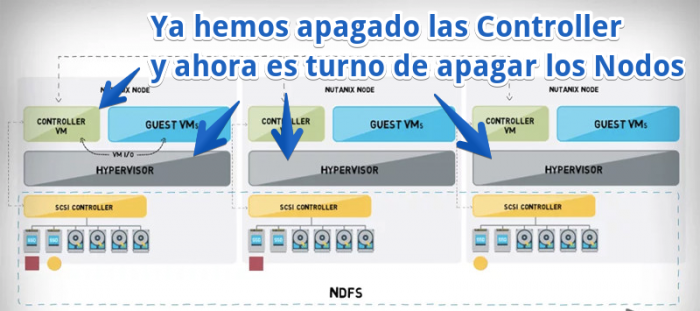
Como sabéis las Controller VM son “simplemente” las VM que gestionan todo el entorno Nutanix, pero para apagar el Cluster entero tendremos que loguearnos a nuestros Nodos, Hypervisor, y apagarlos también, os dejo un diagrama:
Nos loguearemos el Nodo de Nutanix, en mi caso al ser Nested dentro de VMware, puedo abrir la Consola y ejecutar el comando directamente, las credenciales por defecto serán root y nutanix/4u como os dejado más arriba, y comando a ejecutar es un simple:
sudo init 0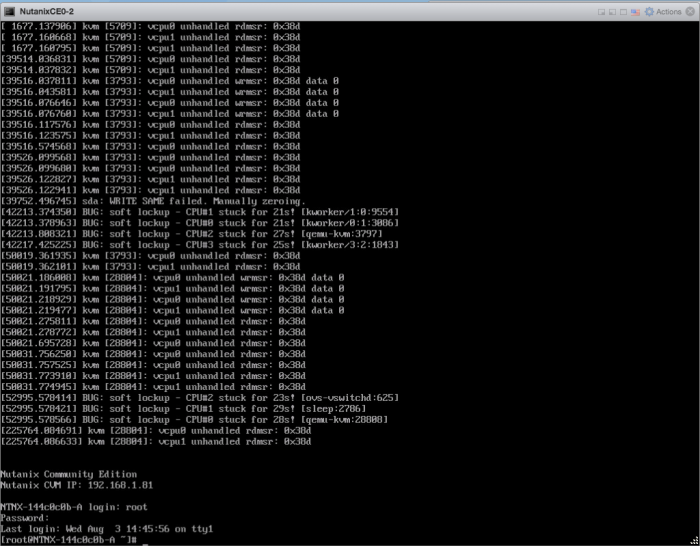
Veremos durante un segundo la siguiente pantalla y el Nodo se apagará también:
Arrancar un Cluster Nutanix
Si por el contrario queremos arrancar un Cluster Nutanix de manera satisfactoria, tendremos que encender los Nodos y darles unos minutos hasta que arrancan automáticamente las CVM, o Controller VM,y hacer SSH a una de ellas y lanzar el siguiente comando:
nutanix@NTNX-a032d256-A-CVM:192.168.1.80:~$ cluster start
2016-11-20 06:56:56 INFO cluster:2168 Executing action start on SVMs 192.168.1.80,192.168.1.81,192.168.1.82
Que nos devolverá el siguiente resultado:
Waiting on 192.168.1.80 (Up) to start:  SSLTerminator SecureFileSync Medusa DynamicRingChanger Pithos Stargate InsightsDB InsightsDataTransfer Ergon Cerebro Chronos Curator Prism CIM AlertManager Arithmos Acropolis Uhura Snmp SysStatCollector Tunnel ClusterHealth Janus NutanixGuestTools MinervaCVM
Waiting on 192.168.1.81 (Up) to start:  Medusa DynamicRingChanger Pithos Stargate InsightsDB InsightsDataTransfer Ergon Cerebro Chronos Curator Prism CIM AlertManager Arithmos Acropolis Uhura Snmp SysStatCollector Tunnel ClusterHealth Janus NutanixGuestTools MinervaCVM
Waiting on 192.168.1.82 (Up, ZeusLeader) to start:  DynamicRingChanger Pithos Stargate InsightsDB InsightsDataTransfer Ergon Cerebro Chronos Curator Prism CIM AlertManager Arithmos Acropolis Uhura
[...]
Waiting on 192.168.1.82 (Up, ZeusLeader) to start:  MinervaCVM
Waiting on 192.168.1.80 (Up) to start:
Waiting on 192.168.1.81 (Up) to start:
Waiting on 192.168.1.82 (Up, ZeusLeader) to start:
The state of the cluster: start
Como podemos ver ya están todos los servicios arriba y ya podremos acceder a nuestro PRISM:
Lockdown mode: Disabled

CVM: 192.168.1.80 Up
Zeus   UP       [2466, 2492, 2493, 2497, 2562, 2581]
Scavenger   UP       [3141, 3169, 3170, 3171]
SSLTerminator   UP       [3595, 3626, 3627, 3629]
SecureFileSync   UP       [3600, 3657, 3658, 3659]
Medusa   UP       [3810, 3837, 3838, 3839, 3984]
DynamicRingChanger   UP       [4831, 4862, 4863, 4896]
Pithos   UP       [4835, 4887, 4888, 4891]
Stargate   UP       [5175, 5205, 5206, 5267, 5268]
InsightsDB   UP       [5182, 5235, 5236, 5325]
InsightsDataTransfer   UP       [5209, 5263, 5264, 5404, 5405]
Ergon   UP       [5250, 5384, 5385, 5387]
Cerebro   UP       [5265, 5458, 5459, 5544]
Chronos   UP       [5304, 5438, 5439, 5479]
Curator   UP       [5409, 5468, 5469, 5529]
Prism   UP       [5460, 5504, 5505, 5549, 6128, 6199]
CIM   UP       [5475, 5527, 5528, 5570]
AlertManager   UP       [5557, 5634, 5635, 5708]
Arithmos   UP       [5610, 5670, 5671, 5745]
Acropolis   UP       [5654, 5724, 5725, 5730]
Uhura   UP       [5675, 5767, 5768, 5769]
Snmp   UP       [5701, 5813, 5814, 5816]
SysStatCollector   UP       [5741, 5827, 5828, 5830]
Tunnel   UP       [5780, 5847, 5848]
ClusterHealth   UP       [5812, 5895, 5896, 6096, 6157, 6158]
Janus   UP       [5843, 5909, 5910]
NutanixGuestTools   UP       [5907, 5955, 5956, 5982]
MinervaCVM   UP       [6015, 6054, 6055, 6057]

CVM: 192.168.1.81 Up
Zeus   UP       [2470, 2496, 2497, 2501, 2532, 2548]
Scavenger   UP       [3044, 3072, 3073, 3074]
SSLTerminator   UP       [2464, 2543, 2544, 2574]
SecureFileSync   UP       [2477, 2545, 2546, 2580]
Medusa   UP       [2735, 2762, 2763, 2764, 2988]
DynamicRingChanger   UP       [3729, 3811, 3812, 3829]
Pithos   UP       [3765, 3825, 3826, 3831]
Stargate   UP       [4119, 4149, 4150, 4192, 4193]
InsightsDB   UP       [4130, 4177, 4178, 4210]
InsightsDataTransfer   UP       [4167, 4233, 4234, 4311, 4312]
Ergon   UP       [4184, 4268, 4270, 4272]
Cerebro   UP       [4298, 4342, 4343, 4388]
Chronos   UP       [4347, 4420, 4421, 4477]
Curator   UP       [4363, 4444, 4445, 4528]
Prism   UP       [4385, 4473, 4474, 4531, 5037]
CIM   UP       [4417, 4518, 4519, 4600]
AlertManager   UP       [4450, 4523, 4524, 4619]
Arithmos   UP       [4525, 4630, 4631, 4687]
Acropolis   UP       [4569, 4667, 4668, 4669]
Uhura   UP       [4607, 4671, 4672, 4673]
Snmp   UP       [4675, 4730, 4731, 4733]
SysStatCollector   UP       [4708, 4766, 4767, 4769]
Tunnel   UP       [4734, 4789, 4790]
ClusterHealth   UP       [4761, 4844, 4846, 5041, 5069, 5070, 5120, 5121]
Janus   UP       [4791, 4858, 4859]
NutanixGuestTools   UP       [4853, 4893, 4894, 4921]
MinervaCVM   UP       [4964, 5011, 5012, 5013, 5099]

CVM: 192.168.1.82 Up, ZeusLeader
Zeus   UP       [2473, 2499, 2500, 2504, 2536, 2551]
Scavenger   UP       [3076, 3104, 3105, 3106]
SSLTerminator   UP       [2123, 2186, 2187, 2188]
SecureFileSync   UP       [2128, 2183, 2184, 2189]
Medusa   UP       [2451, 2486, 2487, 2494, 2762]
DynamicRingChanger   UP       [3501, 3528, 3529, 3559]
Pithos   UP       [3509, 3557, 3558, 3572]
Stargate   UP       [3855, 3885, 3886, 3965, 3966]
InsightsDB   UP       [3870, 3949, 3950, 4100]
InsightsDataTransfer   UP       [3889, 3959, 3960, 4073, 4074]
Ergon   UP       [3898, 4062, 4063, 4065]
Cerebro   UP       [3927, 4080, 4081, 4200]
Chronos   UP       [3962, 4182, 4183, 4231]
Curator   UP       [4070, 4225, 4226, 4305]
Prism   UP       [4172, 4273, 4274, 4355, 4857]
CIM   UP       [4208, 4329, 4330, 4394]
AlertManager   UP       [4234, 4337, 4338, 4420]
Arithmos   UP       [4279, 4387, 4388, 4483]
Acropolis   UP       [4353, 4450, 4451, 4453]
Uhura   UP       [4404, 4505, 4506, 4508]
Snmp   UP       [4464, 4577, 4578, 4582]
SysStatCollector   UP       [4519, 4603, 4604, 4605, 5250]
Tunnel   UP       [4567, 4630, 4631]
ClusterHealth   UP       [4623, 4680, 4681, 4876, 4916, 4917, 4988, 4989]
Janus   UP       [4641, 4714, 4715]
NutanixGuestTools   UP       [4716, 4751, 4752, 4774]
MinervaCVM   UP       [4853, 4894, 4895, 4897, 4994]
2016-11-20 06:57:44 INFO cluster:2279 Success!
Muchas gracias por la lectura y espero que os sirva
hola
estoy teniendo el siguiente problema al instalar nutanix , cuando termina de instalar supuestamente de forma satisfastoria no puedo extraer la unidad usb desde la que fue instalado ya que el sistema deja de funcionar y no arranca sin esta , esto es normal? que estoy haciendo mal?
Saludos Igori,
Donde instalaste el Nutanix? Ademas que versión tienes, Community? donde lo estas instalando?
Un saludo