
 Saludos amigos, llevo varios días viendo como actualizaban el Whitepaper de Horizon 6, pero no acababan de lanzarlo, hoy es un buen día.
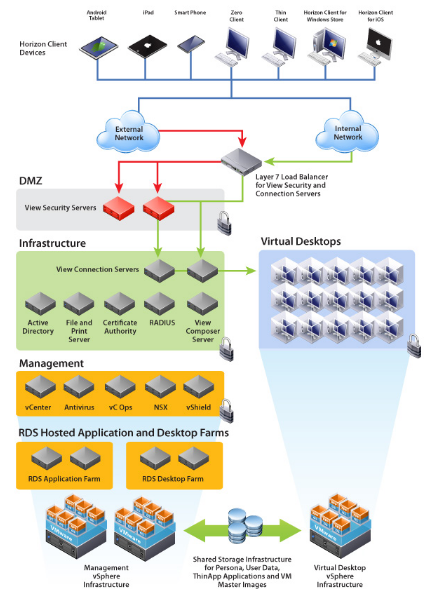
Ya tenemos disponible el Horizon 6 Reviewer’s Guide, un documento creado por y para técnicos, con paso-a-paso y para abrir boca una Topología recomendada y un vistazo a la Arquitectura del producto.
Estos documentos tienen un valor incalculable, pues de un simple vistazo y siguiendo todos los pasos, podemos tener nuestro entorno de VMware Horizon 6 funcionando.
Os dejo aquí un par de puntos del documento traducidos a español para que podáis ver todo el potencial de este documento tan bueno que hoy o dejo.
¿Qué es VMware Horizon 6?
VMware Horizon View es una Infraestructura de escritorio virtual que simplifica la administración de escritorios virtuales y provee a los usuarios de todo lo que necesitan.
Permitiendo a toda su organización acceder mediante un servicio centralizado, a sus escritorios, y además adaptandose a cada usuario y sus necesidades. Horizon 6 nos proporciona una experiencia realmente gratificanete, permitiendo conectarnos desde cualquier lugar del planeta a nuestros recursos de la oficina, incluyendo recursos 3D en caso de ser necesario.
¿Qué es VMware Horizon?
Horizon es la combinación de escritorio y aplicación en un entorno virtual, con el cual podemos proveer, proteger y administrar escritorios y aplicaciones para el usuario final, para que pueda trabajar en cualquier lugar, a cualquier hora y desde cualquier dispositivo.
Funcionalidades Clave
Horizon 6 toma el control completo de todas las características de View y las mezcla con el poder de desplegar aplicaciones, de tal manera que permitimos al departamento de IT otorgar acceso y control a los usuarios de una manera más granular y lo más importante, desde un único y unificado espacio de trabajo.
Horizon 6 además incluye estas funcionalidades clave
•Desktops and Applications Delivered Through a Single Platform – Deliver virtual or remoted desktops and applications through a single platform to streamline management and easily entitle end users.
•Unified Workspace – Securely delivers desktops, applications, and online services to end users through a unified workspace, providing a consistent user experience across devices, locations, media, and connections.
•Closed Loop Management and Automation – Consolidated control, delivery and protection of user compute resources with cloud analytics and automation, cloud orchestration and self-service features.
•Optimization with the Software-Defined Data Center – Allocates resources dynamically with virtual storage, compute, and networking to manage and deliver desktop services on demand.
•Central Image Management – Central image management for physical, virtual, and BYO devices.
•Hybrid-cloud flexibility – Provides an architecture built for onsite and cloud-based deployment.
Nuevas Funcionalidades
In the latest release, Horizon 6 supports the following new features and enhancements.
•Application Remoting – RemoteApp enables administrators to make programs that are accessed remotely through a Remote Desktop Session (RDS) server appear as if they are running on the client computer versus a remote desktop.
•Virtual SAN – Horizon 6 with VMware Virtual SAN™ is a new storage technology that automates storage provisioning and pools together with server-attached flash drives and hard disks and virtualizes them into reliable storage. Built into the vSphere platform, the technology offers greater performance while simplifying storage management. Virtual SAN eliminates the need to overprovision storage to ensure that end users have enough IOPS per desktop.
•Cloud pod architecture – The cloud pod architecture allows organizations to dynamically move and locate View pods across multiple data centers for efficient management of end users across distributed locations.
•vDGA and vSGA 3D graphics enhancements – 3D graphics capabilities are enhanced to augment a graphically rich user experience. Using Virtual Dedicated Graphics Acceleration (vDGA), a single virtual machine is mapped to one physical graphics processing unit (GPU) in the ESXi host, providing high-end, hardware-accelerated workstation graphics. Using Virtual Shared Graphics Acceleration (vSGA), multiple virtual machines leverage physical GPUs that are installed locally in ESXi hosts, providing hardware- accelerated 3D graphics to multiple virtual desktops.
•Unity Touch enhancements – Enhancements to VMware Unity Touch technology make it easier to connect to View Connection Server or a View security server, log in to remote desktops in the data center, and edit the list of connected servers. Unity Touch for VMware Horizon Client makes it easier to run Windows apps on iPhone, iPad, and Android devices.
•Additional OS support – Horizon 6 with View offers Windows Server 2012 R2 OS for server components.
Descargar el documento: VMware Whitepaper – Horizon 6 Reviewer’s Guide
Espero que os sirva tanto como me ha servido a mí en tantas ocasiones estos documentos.
Vía VLADAN.fr
[…] VMware Whitepaper – Horizon 6 Reviewer’s Guide […]