
 Saludos amigos, como breve recordatorio me gustaría comenzar mencionando dos aspectos importantes.
- Zimbra ha movido ya Zimbra Collaboration 8.6.x fuera del Technical Guidance, ya desde Septiembre de 2018 no se lanzaba ningún nuevo parche ni se corregían bugs en esta versión.
- Zimbra Collaboration 8.7.11 (la versión más robusta y sólida que Zimbra ha tenido) se queda sin General Support y entra en Technical Guidance, lo que significa que no veremos más bugs resueltos ni parches, una pena.
- Zimbra Collaboration 8.8.12 se queda sin General Support y entra en Technical Guidance, lo que significa que no veremos más bugs resueltos ni parches.
Para estas versiones, mi recomendación es usar Zextras para migrar desde éstas últimas a Zimbra Collaboration 8.8.15 con el último parche. Ya os lo contaré en un blog, pero por ahora aquí las instrucciones en Inglés.
Zimbra Collaboration 8.8.15 Patch 7
Hace un tiempo que tengo en mi laboratorio Zimbra Collaboration 8.8.15, el cuál intento mantener actualizado al máximo, y hace apenas unos días Zimbra lanzaba un nuevo parche. Os dejo aquí las Release Notes de ésta versión.
Para comenzar, vamos a la parte de seguridad, bugs resueltos:
| Bug# | Descripción | CVE-ID | CVSS Score | Zimbra Rating | Fix Patch Version |
|---|---|---|---|---|---|
| N/A | Revoked share calendars are now being removed from OLK profile. | CVE-2020-8633 | – | – | 8.8.15 P7 |
| N/A | Potential for SSRF if WebEx zimlet installed and zimlet JSP enabled | CVE-2020-7796 | – | – | 8.8.15 P7 |
Novedades en Zimbra Collaboration 8.8.15 Patch 7
Este parche incluye algunas novedades que os detallo a continuación:
| Docs Server | Zimbra Docs server installer is available for Ubuntu 18, Ubuntu 16 and RHEL 7. You can download the Docs server installers from the Zimbra Docs page. |
| ZCS | zmmboxmove command generated “Read timed out” error when using foreground (--sync) mode. This issue is now fixed. |
| Zimbra Drive | Files sent via Zimbra Connect are now visible in Zimbra Drive under a new “Connect Sent Files” root folder. |
| Zimbra Connect | The Zimbra Connect database has been migrated from Zimbra’s MariaDB to a dedicated HSQL instance. Migration is automatically handled during an upgrade. |
| Zimbra Connect | We are now enforcing a hard limit of 4096 characters to all chat messages so that long messages no longer appear truncated in the message history. |
Bugs resueltos en Zimbra Collaboration 8.8.15 Patch 7
Además se incluyen muchos bugs resueltos, que siempre está bien ver que el desarrollo sigue vivo:
| ZCS | Fixed a bug in the EWS extension that was creating tmp files with the prefix /opt/zimbra/jetty_base/work/cxf-. These files led to a rapid increase in disk space in some instances. |
| ZCS | Fixed an issue wherein users were not able to send an email using send-as (persona) with an attachment |
| ZCS | With the default cipher configuration, *Weak cipher suite* warnings appear in the logs. No security concern is associated with the presence of these suites, as they are not used. The warnings may be suppressed by following the instructions in KB23863. |
| ZCO | Fixed Zimbra Migration Tool which was skipping folders due to container class IPF.NOTE |
| ZCO | MS Office 2007 has reached the end of its extended support period so it is no longer supported by any version of ZCO. Current documentation has been updated to reflect this. |
| Zimbra Connect | Updated timezone management to reflect the changes in Brazilian DST usage. |
| Zimbra Connect | Emojis were temporarily disabled in Patch 5 due to a character set incompatibility with an updated version of Zimbra’s database. The problem is now resolved, and emojis are re-enabled. Both the sender and the receiver must be on a server running 8.8.15p7 or higher for the emojis to work as intended. |
| HSM | Fixed a bug that could cause a false positive “Backup Path is case insensitive“ blocking error. |
| NG Backup | The RealTime scanner did not detect the creation of mount-points. This issue has been fixed. |
| NG Mobile | Fixed a bug that caused the response to a complex-repeated calendar appointment to fail. |
| NG Mobile | An iteration error prevented edits made to recurring appointments from correctly syncing with the server. This issue is now fixed. |
| NG Mobile | Device List management now has Zimlet performance improvements so that the initial request that populates the list does not timeout on infrastructures with multiple mailboxd servers. |
| Zimbra Network Modules NG | Fixed a bug that could cause pre-auth validation to fail due to a NullPointerException error while processing Admin NG SOAP commands. As a temporary workaround, stop the logging of Admin NG service with zxsuite admin doStopService logging. Reapply after every mailbox service restart, but note that doing so prevents Admin NG from gathering the information needed to compile its monthly report. |
Aplicar el último parche para Zimbra Collaboration 8.8.15
Antes de hacer nada, os recomiendo tener un backup usando Zextras, y por supuesto un backup del servidor entero, bien sea mediante Veeam Agent for Linux, o usando Veeam si tenemos Zimbra como máquina virtual.
Los paquetes, una vez actualizado deben quedaros en las siguientes versiones:
FOSS
Package Name                     Version
zimbra-patch                  -> 8.8.15.1581056921.p7-1
zimbra-common-core-jar        -> 8.8.15.1580112331-1
zimbra-common-core-libs       -> 8.8.15.1574853769-1
zimbra-mbox-store-libs        -> 8.8.15.1574853769-1
zimbra-mbox-war               -> 8.8.15.1575620896-1
zimbra-mbox-admin-console-war -> 8.8.15.1576145915-1
zimbra-mbox-webclient-war     -> 8.8.15.1576146019-1
zimbra-drive                  -> 1.0.13.1574269069-1
zimbra-core-components        -> 2.0.1-1zimbra8.8b1
zimbra-openjdk                -> 13.0.1-1zimbra8.8b1
zimbra-openssl                -> 1.0.2t-1zimbra8.7b2
NE
Package Name                     Version
zimbra-patch                  -> 8.8.15.1581056921.p7-2
zimbra-mbox-ews-service       -> 8.8.15.1581042143-1
zimbra-drive-ng               -> 3.0.3.1579795540-1
zimbra-network-modules-ng     -> 6.0.8.1579795224-1
zimbra-docs                   -> 3.0.4.1580287588-1
zimbra-connect                -> 1.0.7.1579795729-1
zimbra-zco                    -> 8.8.15.1866.1580112518-1
Vamos a proceder a realizar el update usando el administrador de paquetes, en mi caso Ubuntu, como root:
apt-get update
apt-get upgrade
Veremos los siguientes paquetes a actualizar:
root@zcs:/home/oper# apt-get upgrade
Reading package lists... Done
Building dependency tree
Reading state information... Done
Calculating upgrade... Done
The following packages will be upgraded:
  apport base-files bsdutils cloud-init dmidecode fdisk landscape-common libblkid1 libfdisk1 libmount1 libnss-systemd libpam-systemd libsmartcols1 libsystemd0 libudev1
  libuuid1 linux-firmware mdadm mount python3-apport python3-distupgrade python3-problem-report sosreport systemd systemd-sysv telegraf ubuntu-minimal
  ubuntu-release-upgrader-core ubuntu-server ubuntu-standard udev unattended-upgrades util-linux uuid-runtime zimbra-common-core-jar zimbra-patch
36 upgraded, 0 newly installed, 0 to remove and 0 not upgraded.
Need to get 117 MB of archives.
After this operation, 749 kB of additional disk space will be used.
Do you want to continue? [Y/n]
Ya como root, podremos lanzar el siguiente comando, que básicamente se loguea como usuario zimbra y lanza el arrancado de los servicios:
su - zimbra -c 'zmcontrol restart'
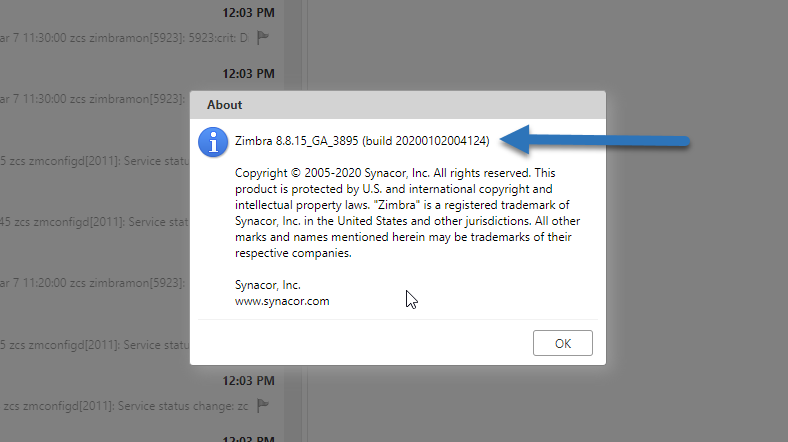
Actualizar a la última versión de Zextras Suite 3.0.7
Otro de los puntos importantes es actualizar nuestra versión de Zextras, para estar a la última con todos los updates y mejoras. Zextras sigue un desarrollo paralelo junto a Zimbra, y hace unos días han actualizado a la versión 3.0.7, vamos a ver las mejoras:
Backup
|
Issue ID: BCK-168 |
|||
|
Title: Invalid failedItems detection during backup path initialization |
|||
|
Description: When the Backup Path is being initialized, deleting an item from a mailbox when the engine is backing it up returned an “Item not found” message since the list of items is fetched by the AccountVisitor at the beginning of the process. |
|||
Mobile
|
Issue ID: MOB-126 |
|||
|
Title: Make optional the dump of actions and encoders in the sync.log. |
|||
|
Description: Added a new log level for both general NG logging and Account Loggers called The |
|||
|
Notes: To set the general NG Log Level to
|
|||
|
Issue ID: MOB-145 |
|||
|
Title: Zimbra account logger to debug won’t show any zextras mobile action. |
|||
|
Description: When enabling Zimbra’s own debug account logger for a single account mobile actions weren’t logged as debug. |
|||
|
Issue ID: MOB-149 |
|||
|
Title: Add 2 more items (16.0 and 16.1) to EAS protocol option |
|||
|
Description: With the addition of EAS 16.0/16.1 support, the relevant Admin Console drop-down selector must be updated accordingly |
|||
|
Notes: EAS16/16.1 is still in beta stage, so the default settings for all devices except for Samsungs remains EAS14.1 |
|||
HSM
|
Issue ID: PS-169 |
|||
|
Title: doMoveMailbox “Moved zimbra db items” always counts one item in excess |
|||
|
Description: A bug in the item counter caused it to be always 1 element off. |
|||
|
Issue ID: PS-175 |
|||
|
Title: RemoveOrphanedBlobs operation delete blobs of items in dumpster |
|||
|
Description: The |
|||
|
Notes: We’ve received several reports of “Missing BLOB” errors in the past couple of months, this might not be the only cause thus we are still investigating all open cases, but it is surely the cause for some of the open escalations (e.g. #34960 and #34944). This will fix the root cause of the issue, the “Missing BLOB” errors will gradually disappear with the Dumpster folder’s content turnover. |
|||
Drive
|
Issue ID: DRIV-29 |
|||
|
Title: Drive search shows duplicated redundant results |
|||
|
Description: When a large number of search results is returned, the result list pagination fails causing blocks of duplicated entries to be loaded instead of the actual entries. |
|||
|
Issue ID: DRIV-30 |
|||
|
Title: Drive search does not paginate if the zoom is too distant |
|||
|
Description: When a large number of search results is returned and entire first “page” of results is visible due to browser zoom settings, the result list pagination fails further results not to be displayed. |
|||
|
Issue ID: DRIV-99 |
|||
|
Title: Duplicated menu items on ‘New’ click |
|||
|
Description: Under some specific conditions, each item in the “New” menu appears twice. |
|||
|
Issue ID: DRIV-394 |
|||
|
Title: Drive copy button misbehaves when entering and then leaving a directory. |
|||
|
Description: When i’m trying to copy a file in Drive, the “copy” confirmation button is initially disabled since it’s not possible to copy a file to the directory where it already is stored. If i create a folder from the “Copy” popup, enter in it and then exit by clicking the “Home” breadcrumb, the copy button is not disabled anymore and i can perform the operation (which is successful) |
|||
|
Issue ID: DRIV-535 |
|||
|
Title: Team chat root is visible even when user disabled its team zimlet. |
|||
|
Description: The “Team Sent Files” Drive root is visible even when the Zimlet is disabled and the root is empty. |
|||
|
Issue ID: DRIV-556 |
|||
|
Title: Select a folder in advance search doesn’t enable the accept button |
|||
|
Description: When using the Advanced Search feature in Drive, clicking on the “Folder” option in the left menu and selecting a folder does not cause the “Accept” button to activate thus making it impossible to confirm the chosen folder. |
|||
Team
|
Issue ID: TEAMS-1073 |
|||
|
Title: Right click does not work in IM input |
|||
|
Description: Right clicking in the text input area of Team is disabled, users are complaining about lack of the Right click → Paste feature. |
|||
|
Issue ID: TEAMS-1182 |
|||
|
Title: Focus should remain on “Add participants” |
|||
|
Description: While creating a new group (probably also in space/channels), when a user select a contact the focus should remain on “Add participants” to simplify the addition of another one. Currently the focus is lost. |
|||
|
Issue ID: TEAMS-1199 |
|||
|
Title: Avoid anonymous_access login with null credentials |
|||
|
Description: By joining an Instant Meeting with a valid email address/display name and then leaving the Instant Meeting while still active it was possible to re-join as null/null. |
|||
|
Issue ID: TEAMS-1226 |
|||
|
Title: Using the Team Tab, a message longer than 4 rows doesn’t scroll down. |
|||
|
Description: When typing a long message in any chat input box within the Team tab, when the message reaches the 5th line no scrolling happened, effectively hiding the part of the message being actively written. |
|||
|
Notes: This only affected the Team Tab, the Mini Chat was not affected |
|||
|
Issue ID: TEAMS-1244 |
|||
|
Title: Implement Send file (copy/paste case) with new async Clipboard api |
|||
|
Description: It is now possible to paste images directly into the Team chat box to send those as files. |
|||
|
Notes: This feature is released as Experimental, as due to the different combinations of use cases and platforms (OS + Browser) its behaviour might be inconsistent across the userbase and we reserve some time to evaluate possible workarounds to platforms that are not functional. To date, copying images from an editor such as The Gimp and from a webpage works on all supported browsers and Operating Sysyems, with the exception of Firefox on OSX which does not support this feature in any scenario. Copying an image from the filesystem only works with Safari on OSX. |
|||
Cómo actualizar a la última versión de Zextras Suite
El proceso de actualización es igual que el de instalación, bajaremos la nueva versión de Zextras:
wget http://download.zextras.com/zextras_suite-latest.tgz
Descomprimiremos el fichero, nos moveremos a la carpeta y lanzaremos el instalador:
tar -xzvf zextras_suite-latest.tgz
cd zextras_suite*
./install.sh all
Eso es todo amigos. Espero vuestros comentarios y experiencias.
Buen día Jorge, muchas gracias por continuar con tus grandes aportes y mantenernos actualizados. Tengo la duda de que si Zextras Suite es gratuito y en caso de ser así, si tienes una guía que me puedas compartir de como utilizar este producto, actualmente utilizo Zimbra Open Source Edition 8.8.15 p1
Saludos Mile,
Zextras es gratuito solo para usarlo por 30 días, que es perfecto para realizar migraciones, etc. Si haces clicks en los banners de la web a la derecha, encontraras zextras y sus precios. Realmente bajitos para todas las características que incluye.
Un saludo
Gracias Jorge por la información, saludos.
Hola Jorge,
Qué recomendarías, Zextras de su web original, or Zimbra Suite Plus de Zimbra? Sé que Zimbra Suice Plus es Zextras, pero como se puede comprar por un lago u otro, cual recomiendas?
Saludos Kevin,
Zextras desde su web. Por que? Soporte nativo y mas rapido sobre sus extensiones, tanto en su foro, como su soporte tecnico. Si contratas Zimbra Suite Plus, y tienes problemas, del soporte de zimbra se lo pasan a Zextras, etc. Se demora todo mucho.
Zextras 100%
Buenas soy novato con zimbra y tengo la siguiente version(Release 8.8.15_GA_3953.RHEL8_64_20200629025823 RHEL8_64 FOSS edition, Patch 8.8.15_P19.) en laboratorio + veeam + repositorio NAS QNAP:
1) Se puede tener 2 zimbra uno con version vieja(8.0.6) + Store historico de correo y el otro zimbra con version nueva(8.8.15) + store vacio para nuevos corrreos y que el usuario tenga ambos store en su cuenta?
2) tengo varios entornos haciendo backup con veeam + NAS Qnap y en el Qnap tengo archivos path”Recicle Bin/…/…/” .VBK, .VIB, .VBM que tengo que eliminar manualmente, se puede evitar esto y que no se acumulen, ya que son de mucho tamaño los generados por mi entorno productivo de zimbra
Buenas Tardes Jorge has oido acerca de que zimbra estaria en el año 2023 dejando fuera de soporte la version open 8.8.15 y que la nueva seria de pago.
Hola. Jorge. gusto en saludarte. Como siempre quitándote un poco de tú valioso tiempo. ya sabes como es mi caso problemas con el zmprov, Desde ese tiempo para acá no he dejado de buscar dicha solución. Mientras ya monte un nuevo server en ubuntu 18.04 y 8.8.15. Conseguí un enlace: https://wiki.zimbra.com/wiki/Zimbra_to_Zimbra_Migration
pero me da el siguiente error:
/opt/zimbra/libexec/zmztozmig –f /opt/zimbra/conf/zmztozmig.conf
2022-08-22 10:28:43,203 main ERROR Unable to locate appender “Stdout” for logger config “root”
2022-08-22 10:28:43,253 main INFO Log4j appears to be running in a Servlet environment, but there’s no log4j-web module available. If you want better web container support, please add the log4j-web JAR to your web archive or server lib directory.
2022-08-22 10:28:43,257 main INFO Log4j appears to be running in a Servlet environment, but there’s no log4j-web module available. If you want better web container support, please add the log4j-web JAR to your web archive or server lib directory.
[INFO|main:1| 08/22/2022 10:28:43]: ConfigFile: /opt/zimbra/conf/zmztozmig.conf
[INFO|main:1| 08/22/2022 10:28:43]: Version: 1.4
[INFO|main:1| 08/22/2022 10:28:43]: Thread count: 2
Exception in thread “main” java.lang.NoClassDefFoundError: javax/xml/soap/SOAPException
at com.zimbra.tarformatter.tarMigrator.Init(tarFormatter.java:141)
at com.zimbra.tarformatter.tarFormatter.Execute(tarFormatter.java:595)
at com.zimbra.tarformatter.tarFormatter.main(tarFormatter.java:814)
Caused by: java.lang.ClassNotFoundException: javax.xml.soap.SOAPException
at java.base/jdk.internal.loader.BuiltinClassLoader.loadClass(BuiltinClassLoader.java:641)
at java.base/jdk.internal.loader.ClassLoaders$AppClassLoader.loadClass(ClassLoaders.java:188)
at java.base/java.lang.ClassLoader.loadClass(ClassLoader.java:520)
… 3 more
¿Que puede ser esto? Gracias, por tu tiempo. Siempre agradecido del apoyo.
Saludos,
Yo haria una migracion usando zextras, si esto no puede ser, quiza la opcion de rsync funcione mejor:
https://wiki.zimbra.com/wiki/ZCS_to_ZCS_rsync_Migration
Un saludo
Hola Jorge, en esta ocasión quisiera preguntar por el error: mail.NO_SUCH_MSG me sale cuando voy a reenviar un mensaje y no carga la firma se soluciona borrando el icono de imagen rota pero son muchos mensajes que se deben responder estoy usando Release 8.8.15.GA.4179. Patch 8.8.15_P39. sabes una forma de poder reemplazar el archivo roto de encontrar la ruta para reemplazarlo o si hay la opción de omitir ese error y que permita enviar el mensaje con la imagen de la firma rota. Gracias
hola Jorge como estas, soy administrador (cuando se puede) de 2 servidores de zimbra ose 8.8.15 los cuales a pesar de tener el ultimo parche disponible han sido victimas de la vulnertabilidad snmp que permite la instalacion de scripts maliciosos creacion de paginas jsp.etc. He tomado medidad de mitigacion no permitiendo modificacion del cron del usuario zimbra, desactivacion del servicio snmp, notificaciiones snmp y con paciencia he recivado las carpetas webapps buscando y quitando paginas jsp sospechossas.
Que camino o mejor solucion me queda pasar a que version de zimbra compilada por terceros, o carbonium?
Esto teniendo en cuenta que las cuentas tienen mucho correo por sobre todo falta de tiempo en poder limpiarlas eliminando mucho correo viejo