
 Tutorial detallado de cómo instalar Zimbra Collaboration en su versión 9 sobre Ubuntu 18.04 LTS. Que incluye la nueva interfaz Modern UI, responsive y muy fresca.
Zimbra ha lanzado Zimbra9, que además incluye soporte para Ubuntu 18.04 LTS y eso son mágnificas noticias, ya que nos pone con un producto soportado por Canonical (Ubuntu) hasta 2028 y Zimbra Collaboration 9.x hasta 2023, lo que nos da casi tres años sin tener que migrar nada.
Este blog post está sponsorizado por Zextras, el mejor aliado para todas las instalaciones de Zimbra Collaboration, veremos más sobre este producto en futuras entradas.
Vamos allá con el menú
- Preparación de la VM (vmxnet3 y pvscsi)
- Preparación del Servidor
- Instalación del Sistema Operativo
- Preparación del Sistema Operativo para Zimbra
- Instalación de Zimbra 9
- ¿Qué hacer una vez instalado?
Grabación del directo sobre Zimbra 9 – Muchos consejos e instalación paso-a-paso
Os dejo esta grabación de una sesión que hice en vivo hace unos días, en ella, vemos las Release Notes, instalamos desde cero todo, y además damos un vistazo rápido a la nueva interfaz. ¡OJO! Que dura una hora y media:
1.- Preparación de la VM (vmxnet3 y pvscsi)
Este laboratorio vamos a crear una VM con las mejores recomendaciones de VMware, usaremos vmxnet3 para la Red, y PVSCSI para la Controladora de disco, lo cual es perfecto ya que Zimbra se caracteriza por hacer un uso intensivo de disco en las VM que contienen el servicio de Mailbox, como nuestro caso es un Single-Server, lo notaremos más aún.
El primer paso para la creación de la VM, será seleccionar la primera opción y pulsar siguiente: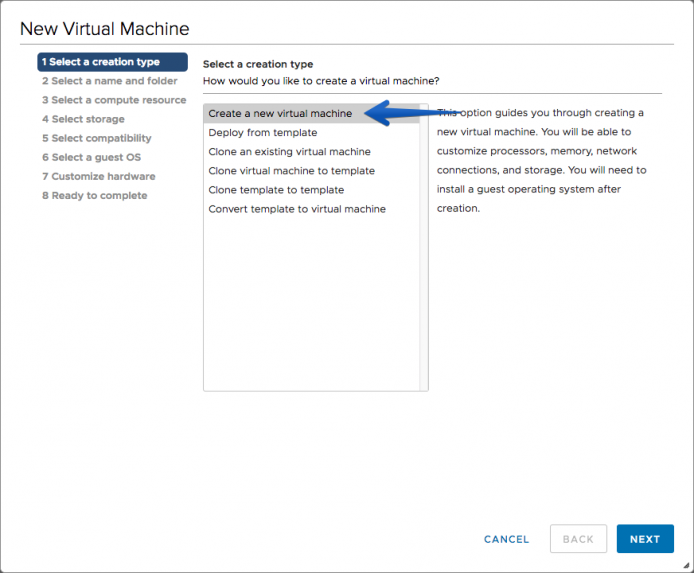 Seleccionaremos el nombre de la VM y la carpeta donde queremos guardarla:
 Seleccionaremos el Cluster o Host donde queremos alojar la VM:
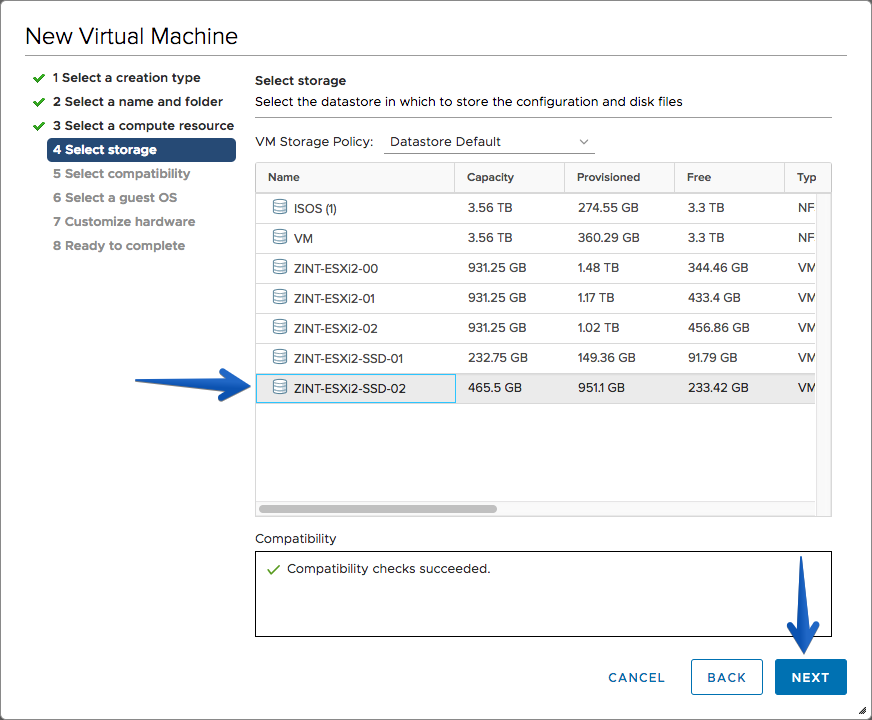
 Seleccionaremos nuestro Storage donde queramos instalar Zimbra. Como ya he comentado en más ocasiones, Zimbra hace un uso intensivo de disco, por lo que yo recomiendo que el rol de Mailbox, o si es Single-Server, se instale sobre los discos más rápidos que tengáis, no SATA, ni tampoco RAID5 sobre SATA.
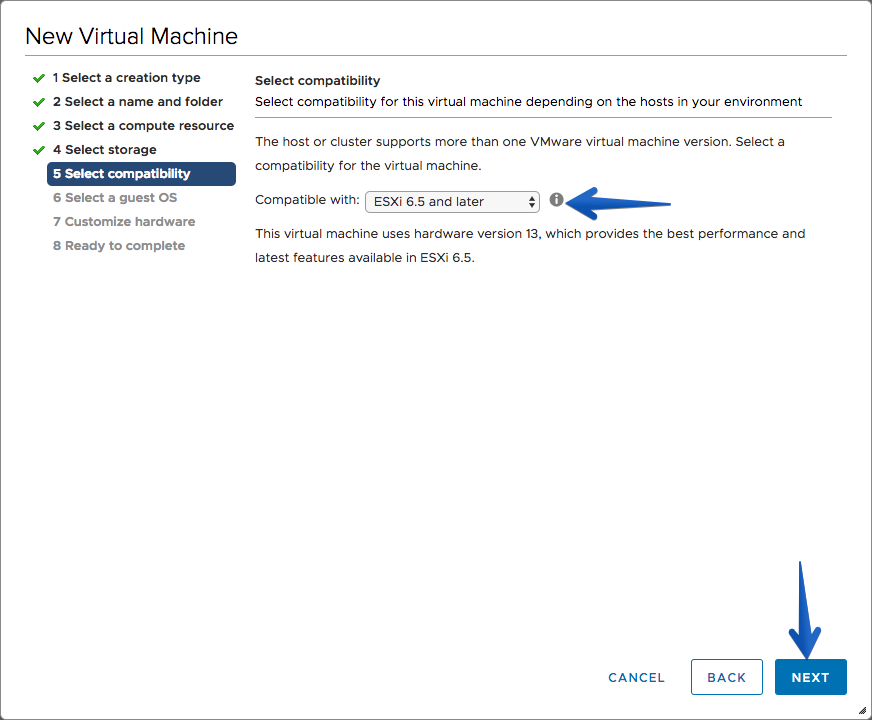
 Seleccionaremos la compatibilidad de ESXi, en mi caso al tener solo Hosts en ESXi 7 he seleccionado 6.5 y superiores:
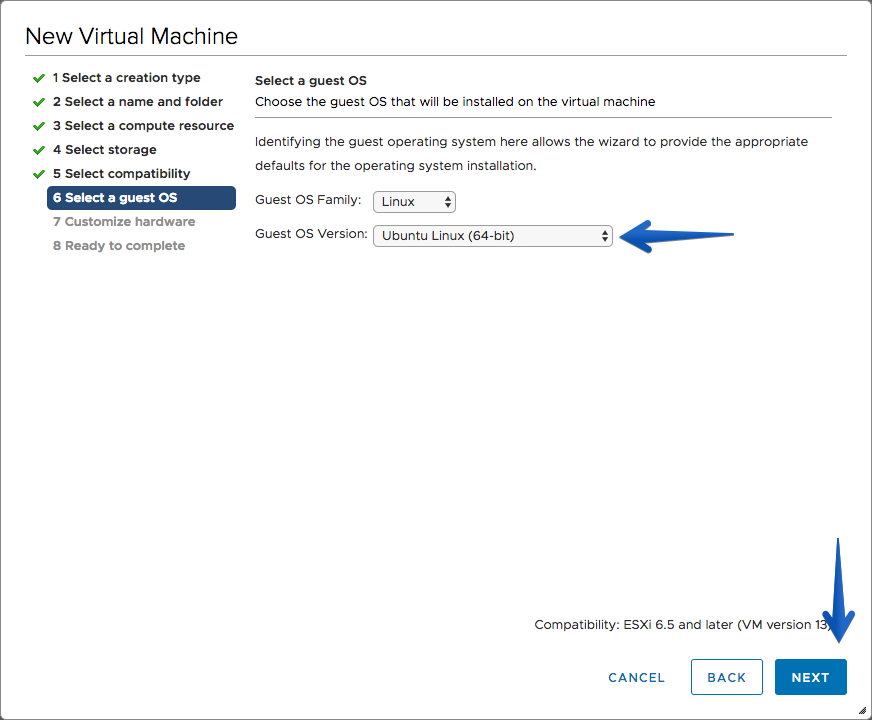
 Es el turno de seleccionar el Guest OS Family, en mi caso he marcado de tipo Linux y Ubuntu Linux 64-bit.
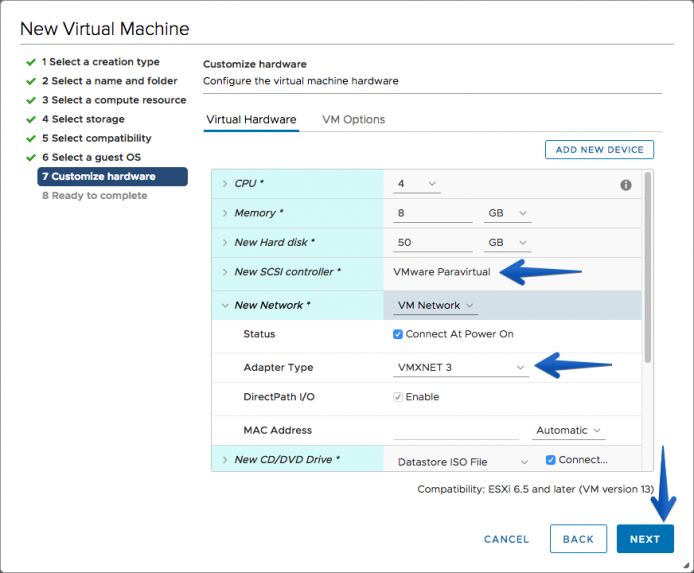
 A la hora de Customize Settings, es donde deberemos prestar atención, y cambiar la SCSI Controller a VMware Paravirtual, así como el adaptador de red que ya debería venir de serie en VMXNET3.
 Por último en el resumen, podremos ver si está todo correcto y pulsar finalmente en Finish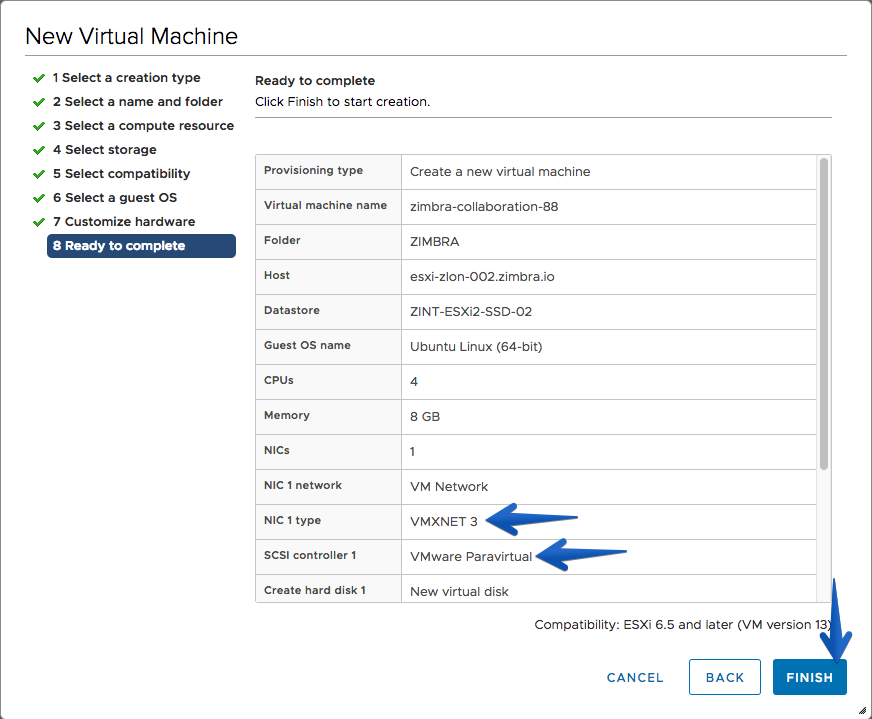
2.- Preparación del Servidor
Este laboratorio está ejecutando la última versión de Ubuntu 18.04 LTS sobre VMware vSphere 7. En este tutorial, se ha mostrado el paso a paso de la VM, simplemente tengamos en cuenta para nuestro laboratorio los siguientes requisitos:
- 4vCPU o más para mejor rendimiento
- 8GB de RAM o más para mejor rendimiento
- 25GB para poder ejecutar todo y alojar algunos Buzones de prueba, necesitaremos al menos 100 GB en un entorno de disco ultra rápido para rendimiento óptimo.
- Conectividad a Internet, si queremos enviar y recibir correos
- Correcta configuración de DNS, interna y externa
3.- Instalación del Sistema Operativo
Vamos a apoyarnos en la instalación paso-a-paso de Ubuntu Server 18.04 LTS el siguiente vídeo:
Lo más seguro es que al acabar la instalación, si no hemos tocado nada por defecto en la configuración de disco, tengamos solo 4GB en la partición de sistema /, que es la misma que usará /opt/zimbra, con lo que os recomiendo extender el disco de la siguiente manera:
sudo lvextend -l 100%FREE --resizefs /dev/ubuntu-vg/ubuntu-lv
4.- Preparación del Sistema Operativo para Zimbra
Lo primero que tenemos que hacer es cambiar de usuario normal a root
sudo su
[sudo] password for oper:
root@zcs:/home/oper#
Una vez somos root, si no hubiéramos puesto la red en el asistente o nos hubiera otorgado una dirección IP por DHCP, tendremos que editar el siguiente fichero si estamos usando Ubuntu 18.04, ya que viene con el nuevo netplan network configuration:
vi /etc/netplan/50-cloud-init.yaml
Tendremos que introducir lo siguiente:
 This file is generated from information provided by
# the datasource.  Changes to it will not persist across an instance.
# To disable cloud-init's network configuration capabilities, write a file
# /etc/cloud/cloud.cfg.d/99-disable-network-config.cfg with the following:
# network: {config: disabled}
network:
    ethernets:
        ens192:
            addresses:
            - 192.168.1.235/24
            gateway4: 192.168.1.1
            nameservers:
                addresses:
                - [127.0.0.1,1.1.1.1]
    version: 2
Donde pone addresses habrá que cambiarlo por la IP que queramos poner y el gateway la dirección del router que tengamos en esa red, y de DNS Server deberemos poner o el propio servidor de Zimbra si vamos a usarlo de DNS, o un DNS externo.
Una vez tengamos esto, haremos un apply de la config:
sudo netplan apply
Si quisieramos hacer un debug, hariamos lo siguiente:
sudo netplan --debug apply
** (generate:1962): DEBUG: 00:03:23.322: Processing input file /etc/netplan/50-cloud-init.yaml..
** (generate:1962): DEBUG: 00:03:23.322: starting new processing pass
** (generate:1962): DEBUG: 00:03:23.323: ens192: setting default backend to 1
** (generate:1962): DEBUG: 00:03:23.323: Configuration is valid
** (generate:1962): DEBUG: 00:03:23.323: Generating output files..
** (generate:1962): DEBUG: 00:03:23.323: NetworkManager: definition ens192 is not for us (backend 1)
DEBUG:netplan generated networkd configuration changed, restarting networkd
DEBUG:no netplan generated NM configuration exists
DEBUG:ens192 not found in {}
DEBUG:Merged config:
network:
  bonds: {}
  bridges: {}
  ethernets:
    ens192:
      addresses:
      - 192.168.1.235/24
      gateway4: 192.168.1.1
      nameservers:
        addresses:
        - [127.0.0.1,1.1.1.1]
  vlans: {}
  wifis: {}

DEBUG:Skipping non-physical interface: lo
DEBUG:device ens192 operstate is up, not changing
DEBUG:{}
DEBUG:netplan triggering .link rules for lo
DEBUG:netplan triggering .link rules for ens192
Deberemos verificar que nuestro fichero /etc/resolv.conf está también bien configurado:
# Dynamic resolv.conf(5) file for glibc resolver(3) generated by resolvconf(8)
#     DO NOT EDIT THIS FILE BY HAND -- YOUR CHANGES WILL BE OVERWRITTEN
nameserver 127.0.0.1
nameserver 8.8.8.8
Deberemos también verificar que nuestro fichero Hosts está correctamente configurado:
vim /etc/hosts
Deberemos tener algo como lo siguiente, donde es importante que tengamos nuestra IP local, con el hostname+dominio y luego hostname
192.168.1.235 zcs.example.com zcs
127.0.0.1       localhost.localdomain localhost

# The following lines are desirable for IPv6 capable hosts
::1     localhost ip6-localhost ip6-loopback
ff02::1 ip6-allnodes
ff02::2 ip6-allrouters
Reiniciaremos el equipo con un simple reboot en consola:
reboot
4.1.- Instalación del servidor DNS
Instalamos el servidor DNS dnsmasq, que es bastante sencillo y muy cómodo para laboratorios o pequeños entornos.
Si estamos usando la última versión de Ubuntu Server 18.04, es probable que tengas instalado un mini servidor de DNS, para consultas de caché, etc, vamos a desinstalarlo primero:
sudo systemctl disable systemd-resolved
sudo systemctl stop systemd-resolved
sudo rm /etc/resolv.conf
echo "nameserver 1.1.1.1" > /etc/resolv.conf
El primer comando que ejecutaremos, una vez hemos seguido los pasos anteriores, será el de la instalación del paquete, donde haremos click en Y cuando pregunte:
apt-get install dnsmasq
Reading package lists... Done
Building dependency tree
Reading state information... Done
Suggested packages:
  resolvconf
The following NEW packages will be installed:
  dnsmasq
0 upgraded, 1 newly installed, 0 to remove and 0 not upgraded.
Need to get 16.2 kB of archives.
After this operation, 73.7 kB of additional disk space will be used.
Get:1 http://archive.ubuntu.com/ubuntu bionic/universe amd64 dnsmasq all 2.79-1 [16.2 kB]
Fetched 16.2 kB in 0s (157 kB/s)
Selecting previously unselected package dnsmasq.
(Reading database ... 66878 files and directories currently installed.)
Preparing to unpack .../dnsmasq_2.79-1_all.deb ...
Unpacking dnsmasq (2.79-1) ...
Setting up dnsmasq (2.79-1) ...
Created symlink /etc/systemd/system/multi-user.target.wants/dnsmasq.service → /lib/systemd/system/dnsmasq.service.
Processing triggers for ureadahead (0.100.0-21) ...
Processing triggers for systemd (237-3ubuntu10.29) ...
Editaremos ahora la configuración de dnsmasq para añadirle las entradas necesarias:
server=1.1.1.1
listen-address=127.0.0.1
domain=jorgedelacruz.es
mx-host=jorgedelacruz.es,zcs.jorgedelacruz.es,0
address=/zcs.jorgedelacruz.es/192.168.1.235
Una vez guardado el fichero, reiniciaremos el servicio de dnsmasq
service dnsmasq restart
* Restarting DNS forwarder and DHCP server dnsmasq
...done.
4.2.- Tests para comprobar DNS
Dos tests básicos que debemos hacer antes de instalar Zimbra Collaboration es comprobar que el MX resuelve bien, y también que nuestra entrada DNS de tipo A resuelve, lo podemos comprobar con la herramienta dig:
Comprobando el MX:
dig mx jorgedelacruz.es

; <<>> DiG 9.11.3-1ubuntu1.9-Ubuntu <<>> mx jorgedelacruz.es
;; global options: +cmd
;; Got answer:
;; ->>HEADER<<- opcode: QUERY, status: NOERROR, id: 8778
;; flags: qr rd ra; QUERY: 1, ANSWER: 1, AUTHORITY: 0, ADDITIONAL: 1

;; OPT PSEUDOSECTION:
; EDNS: version: 0, flags:; udp: 65494
;; QUESTION SECTION:
;jorgedelacruz.es.              IN      MX

;; ANSWER SECTION:
jorgedelacruz.es.       0       IN      MX      0 zcs.jorgedelacruz.es.

;; Query time: 0 msec
;; SERVER: 127.0.0.53#53(127.0.0.53)
;; WHEN: Thu Sep 19 00:03:36 UTC 2019
;; MSG SIZE  rcvd: 65
Comprobando el Host A:
dig zcs.jorgedelacruz.es

; <<>> DiG 9.11.3-1ubuntu1.9-Ubuntu <<>> zcs.jorgedelacruz.es
;; global options: +cmd
;; Got answer:
;; ->>HEADER<<- opcode: QUERY, status: NOERROR, id: 48780
;; flags: qr rd ra; QUERY: 1, ANSWER: 1, AUTHORITY: 0, ADDITIONAL: 1

;; OPT PSEUDOSECTION:
; EDNS: version: 0, flags:; udp: 65494
;; QUESTION SECTION:
;zcs.jorgedelacruz.es.          IN      A

;; ANSWER SECTION:
zcs.jorgedelacruz.es.   0       IN      A       192.168.1.235

;; Query time: 0 msec
;; SERVER: 127.0.0.53#53(127.0.0.53)
;; WHEN: Thu Sep 19 00:04:31 UTC 2019
;; MSG SIZE  rcvd: 65
Podemos ver en la prueba anterior que lanzamos una consulta y nos devuelve un answer/respuesta y que el Server que se encarga de responder es 127.0.0.1, también valdría la IP local 192.168.1.235, si no tenéis estos resultados, por favor comprobar la configuración, o dejar un comentario para que os pueda ayudar.
5.- Instalación de Zimbra 9 Network Edition para Ubuntu 18.04 LTS
Ha llegado la hora de instalar el nuevo software de Zimbra, que podemos encontrar en el siguiente link.
Vamos a descargar la última versión de Zimbra 9 para Ubuntu 18.04 LTS
Procedemos a descomprimir el fichero descargado y cambiaremos al directorio que acabamos de crear.
mkdir /tmp/zcs
cd /tmp/zcs
wget https://files.zimbra.com/downloads/9.0.0_GA/zcs-NETWORK-9.0.0_GA_3924.UBUNTU18_64.20200331010312.tgz
Extraeremos el fichero de la siguiente manera, y nos moveremos a la carpeta creada:
tar xzvf zcs-NETWORK-9.0.0_GA_3924.UBUNTU18_64.20200331010312.tgz
cd zcs-NETWORK-9.0.0_GA_3924.UBUNTU18_64.20200331010312
Tendremos que solicitar una licencia de prueba de Network Edition, o si ya tenemos una podemos aplicarla a la hora de instalar, de la siguiente manera:
./install.sh -l /tmp/zcs/license.xml
Y procedemos a instalar Zimbra Collaboration 9:
Operations logged to /tmp/install.log.0ji4EWl8
Checking for existing installation...
    zimbra-drive...NOT FOUND
    zimbra-imapd...NOT FOUND
    zimbra-modern-ui...NOT FOUND
    zimbra-modern-zimlets...NOT FOUND
    zimbra-patch...NOT FOUND
    zimbra-mta-patch...NOT FOUND
    zimbra-proxy-patch...NOT FOUND
    zimbra-license-tools...NOT FOUND
    zimbra-license-extension...NOT FOUND
    zimbra-network-store...NOT FOUND
    zimbra-network-modules-ng...NOT FOUND
    zimbra-chat...NOT FOUND
    zimbra-connect...NOT FOUND
    zimbra-talk...NOT FOUND
    zimbra-ldap...NOT FOUND
    zimbra-logger...NOT FOUND
    zimbra-mta...NOT FOUND
    zimbra-dnscache...NOT FOUND
    zimbra-snmp...NOT FOUND
    zimbra-store...NOT FOUND
    zimbra-apache...NOT FOUND
    zimbra-spell...NOT FOUND
    zimbra-convertd...NOT FOUND
    zimbra-memcached...NOT FOUND
    zimbra-proxy...NOT FOUND
    zimbra-archiving...NOT FOUND
    zimbra-core...NOT FOUND


IMPORTANT-READ CAREFULLY: THE TERMS OF THIS END USER LICENSE AGREEMENT ("EULA") WILL GOVERN YOUR USE OF THE SOFTWARE. BY DOWNLOADING, INSTALLING, OR USING THE SOFTWARE, YOU (THE INDIVIDUAL OR LEGAL ENTITY) ARE (1) REPRESENTING THAT YOU ARE OVER THE AGE OF 18 AND HAVE THE CAPACITY AND AUTHORITY TO BIND YOURSELF OR THE LEGAL ENTITY, AS APPLICABLE, TO THE TERMS OF THIS EULA AND (2) AGREEING ON BEHALF OF YOURSELF AND/OR AS AN AUTHORIZED REPRESENTATIVE OF THE LEGAL ENTITY, AS APPLICABLE, TO BE BOUND BY THIS EULA. IF YOU DO NOT AGREE TO THE TERMS OF THIS EULA, YOU MUST NOT DOWNLOAD, INSTALL, OR USE THE SOFTWARE.

EVALUATION LICENSE.  If You are licensing the Software for evaluation purposes, Your use of the Software is only permitted in a non-production environment and for the period limited by the License Key. Notwithstanding any other provision in this EULA, an Evaluation License of the Software is provided "AS-IS" without indemnification, support, or warranty of any kind, expressed or implied.

1. DEFINITIONS
1.1 "Affiliate" means, with respect to a party, an entity that is directly or indirectly controlled by or is under common control with such party, where ?control? means an ownership, voting, or similar interest representing fifty percent (50%) or more of the total interests then outstanding of the relevant entity (but only as long as such person or entity meets these requirements).
1.2 "Documentation" means the documentation that is generally provided to You by Synacor with the Software, as revised by Synacor or its licensors from time to time, and which may include end-user manuals, operation instructions, installation guides, release notes, and on-line help files regarding the use of the Software.
1.3 "Guest Operating Systems" means instances of third-party operating systems licensed by You, installed in a Virtual Machine and run using the Software.
[...]

SYNACOR, INC.
END USER LICENSE AGREEMENT
FOR ZIMBRA NETWORK EDITION

(c) Copyright 2020 Synacor, Inc. All rights reserved.

Do you agree with the terms of the software license agreement? [N] y
Vamos a seleccionar “y” si aceptamos la EULA que nos indica en el enlace, además es importante destacar que Zimbra ha migrado a GPL v2.5. Además, tendremos que aceptar otras condiciones de software adicionales:
END USER SOFTWARE LICENSE AGREEMENT
IMPORTANT - READ CAREFULLY CAUTION:


IF YOU INSTALL OR USE THIS SOFTWARE, THE FOLLOWING TERMS WILL APPLY.


1. LICENSE GRANT. Subject to the terms and conditions of this End User Software
License Agreement ("Agreement"), Autonomy, Inc. or Verity, Inc. a part of the
Autonomy group, as applicable, ("Autonomy") grants you ("Licensee" a personal,
nonexclusive, non-transferable, non-assignable and non-sublicenseable, limited
license to use the software identified in an Autonomy Product Schedule signed
by Licensee, in binary executable form only (the "Software"), only in
accordance with the accompanying technical documentation ("Documentation";
collectively with the Software, the "Product"), and only as specified in the
applicable Autonomy Product Use Certificate and Product Schedule attached
thereto (collectively, the "Product Schedule"). "Software" does not refer to
source code and no license is granted with respect to source code of any kind.
Licensee acknowledges that the Software may be shipped with certain libraries
and other code that are not licensed under this Agreement, but rather are
provided to Licensee pursuant to the terms and conditions of separate
open-source license agreements ("Open Source Code"). Such separate license
terms are provided on the Product disc in the ThirdPartyLicense.txt file. Any
support warranty or indemnification Autonomy provides for the Product does not
extend to Open Source Code. Each Product Schedule shall be subject to the terms
and conditions of this Agreement, provided, however, that any conflict between
the terms and conditions of this Agreement and any Product Schedule shall be
resolved in favor of the Product Schedule. Except as expressly set forth in
this Agreement, Licensee shall not (directly or indirectly, in whole or in
part): (i) make more copies of the Product than the number of copies permitted
on the applicable Product Schedule, except for one (1) copy of the Software
solely for archival purposes; (ii) cause or permit any reverse engineering,
decompilation, modification, translation or disassembly of the Software; (iii)
sell, rent, sublicense, distribute, disclose, publish, assign, commercially
share (including time share), or otherwise transfer any rights in the Product
without Autonomy's prior written consent; (iv) use the Software for service
bureau services including, without limitation, providing third party hosting,
or third party application integration or application service provider type
services, or for any similar services; (v) permit any third party application
to access the collection of data indexed by the Software, or use the Software
to create or populate any other collection (except with Autonomy's prior
written consent); and (viii) will not, and will not permit to be done, anything
which shall adversely affect Autonomy's right, title or interest in or to the
Software. Notwithstanding the terms to the contrary in this section, to the
extent that the Product includes any Open Source Code that is licensed under
the GNU Lesser General Public License ("LGPL Code") or Apache Code, Licensee
may modify the Open Source Code in the Product for Licensee's own use and
reverse-engineer the Open Source Code in the Product solely to the extent
necessary to debug Licensee's modifications, in both cases solely to the extent
necessary for Licensee to modify the LGPL Code and/or Apache Code and relink
the modified LGPL Code/Apache Code to the Product. Title and ownership of all
proprietary rights, including any copyright, patent, trade secret, trademark or
other intellectual property rights, in and to the Product and any copies
thereof, including all updates, enhancements and modifications to the Software,
is and will at all times remain the property of Autonomy and its licensors.
Autonomy and its licensors retain all right, title and interest in and to the
Product that are not specifically granted to Licensee hereunder. Licensee shall
not remove or obliterate any copyright, trademark or proprietary rights notice
of Autonomy or its licensors from the Product and shall reproduce all such
notices on all authorized copies of the Product.


2. TERM AND TERMINATION. This Agreement may be terminated earlier by either
party on thirty (30) days written notice if the other party breaches any
material obligation hereunder and such breach is not cured within such thirty
(30) day period, unless such breach cannot be cured, in which case this
Agreement shall immediately terminate upon notice of termination. Without
prejudice to any other rights to which it may be entitled, Autonomy may give
notice in writing to Licensee terminating this Agreement with immediate effect
if Licensee: (a) becomes insolvent, (b) makes an assignment for the benefit of
creditors, (c) files or has filed against it a petition in bankruptcy or
seeking reorganization, (d) has a receiver appointed, (e) ceases conducting
business in the normal course, or (f) institutes any proceeding for liquidation
or winding up; provided, however, that, in the case any of the foregoing is
involuntary, Licensee shall only be in breach if such petition or proceeding
has not been dismissed within thirty (30) days. Upon termination, Licensee
shall immediately remove and cease to use the Product and will return to
Autonomy or destroy all copies of the Product or any part thereof (in any form
or media), and certify in writing to Autonomy that Licensee has complied with
the foregoing obligations.


3. SUPPORT. Licensee may elect to purchase and receive maintenance and support
services for Software in accordance with the Autonomy Support Program Terms and
Conditions, available at
http://www.autonomy.com/content/Support/TermsAndConditions.html ("Support
Services"). 4. LIMITED WARRANTY AND DISCLAIMER. Autonomy warrants to Licensee
that for a period of thirty (30) days from the date of initial delivery of the
Software to Licensee, the Software will substantially perform in accordance
with Autonomy's standard data sheets (available at
http://www.autonomy.com/datasheets). This warranty applies only to problems
reported by Licensee to Autonomy during the aforesaid warranty period. The
foregoing warranty shall not apply to any Software that has been modified other
than by Autonomy, or that has been improperly installed or used in any manner
other than as authorized under this Agreement. LICENSEE'S SOLE AND EXCLUSIVE
REMEDY UNDER ANY WARRANTY SHALL BE LIMITED, AT AUTONOMY'S DISCRETION, TO
SUPPORT OR REPLACEMENT OF THE SOFTWARE. TO THE FULLEST EXTENT PERMITTED BY
APPLICABLE LAW, AUTONOMY AND ITS LICENSORS DISCLAIM ANY AND ALL OTHER
WARRANTIES, EXPRESS OR IMPLIED, INCLUDING, WITHOUT LIMITATION, THE IMPLIED
WARRANTIES OF MERCHANTABILITY, FITNESS FOR A PARTICULAR PURPOSE AND
NONINFRINGEMENT. EXCEPT FOR THE LIMITED WARRANTY PROVIDED PURSUANT TO THIS
SECTION


4. THE PRODUCT IS PROVIDED "AS IS". AUTONOMY DOES NOT WARRANT THAT THE SOFTWARE
OR THE FUNCTIONS CONTAINED IN THE SOFTWARE WILL MEET LICENSEE'S REQUIREMENTS,
OPERATE WITHOUT INTERRUPTION OR BE ERROR FREE. Some states or jurisdictions do
not allow the exclusion of implied warranties or limitations on how long an
implied warranty may last, so the above limitations may not apply to Licensee.
To the extent permissible, any implied warranties are limited to thirty (30)
days. This warranty gives Licensee specific legal rights. Licensee may have
other rights, which vary from state to state or jurisdiction to jurisdiction.
For further warranty information, contact Autonomy's Legal Department at One
Market, Spear Tower, 19th Floor, San Francisco, California 94105.

5. LIMITATION OF LIABILITY. IN NO EVENT WILL AUTONOMY OR ITS LICENSORS BE
LIABLE FOR SPECIAL, INDIRECT, INCIDENTAL OR CONSEQUENTIAL DAMAGES (INCLUDING,
WITHOUT LIMITATION, LOST PROFITS, BUSINESS INTERRUPTION, AND LOSS OR INACCURACY
OF INFORMATION), REGARDLESS OF THE FORM OF ACTION, EVEN IF THE CLAIM WAS
REASONABLY FORESEEABLE OR IF AUTONOMY WAS ADVISED OF THE POSSIBILITY OF SUCH
DAMAGES. IN NO EVENT WILL AUTONOMY'S OR ITS LICENSORS' AGGREGATE LIABILITY
UNDER ANY AND ALL CLAIMS ARISING OUT OF THIS AGREEMENT EXCEED THE LICENSE FEES
PAID BY LICENSEE TO AUTONOMY FOR THE APPLICABLE SOFTWARE DURING THE TWELVE (12)
MONTH PERIOD PRECEDING THE INITIAL EVENT RESULTING IN SUCH CLAIMS. Some states
or jurisdictions do not allow the exclusion or limitation of incidental,
consequential or special damages, so the above exclusions and limitations may
not apply to Licensee.


6. CONFIDENTIALITY. Except as expressly and unambiguously permitted hereunder,
each party shall hold in confidence and not use or disclose any materials or
information disclosed by the other party that are confidential or proprietary,
or which may be reasonably regarded as the confidential information of the
other party ("Confidential Information"). Confidential Information will also
include the Software, Documentation, and any new product information or the
results of any benchmark or similar tests on the Software conducted by Licensee
or divulged by Licensee to Autonomy. Each party shall treat the other party's
Confidential Information with at least the same degree of care it uses to
prevent unauthorized disclosure or use of its own Confidential Information, but
in no event less than reasonable care. Confidential Information will not
include any materials or information that the recipient can prove (i) is now,
or later becomes, through no act or failure to act on the part of the receiving
party, generally known or available to the public; (ii) is known by the
receiving party at the time of disclosure as evidenced by its records; (iii) is
furnished to the receiving party by a third party, as a matter of right and
without restriction on disclosure; (iv) is independently developed by the
receiving party without any breach of this Agreement; (v) is the subject of a
written permission to disclose provided by the disclosing party; or (vi) is
disclosed in response to a valid order of a court or other governmental body.


7. FEES, PAYMENT AND DELIVERY. Invoices for license fees and support fees shall
be rendered to Licensee upon Autonomy's shipment of the Software. Unless
otherwise indicated in the Product Schedule, Licensee shall pay Autonomy the
fees set forth in the applicable invoice within thirty (30) days from the date
of invoice. All fees are exclusive of shipping, taxes, duties and other similar
fees, all of which shall be the responsibility of and shall be paid by
Licensee. A charge of one and one-half (1 1/2) percent per month will be
applied to all overdue invoices. Licensee agrees to pay for all reasonable
costs (including reasonable attorneys' fees) incurred in collecting past due
amounts under this Agreement. All shipments shall be ExWorks point of
manufacture (per Incoterms 2000). Delivery may be electronic, such as via FTP.


8. INTELLECTUAL PROPERTY RIGHTS. Licensee agrees to promptly notify Autonomy of
any known or suspected infringement or breach of Autonomy's proprietary rights.
Autonomy shall have the exclusive right to institute infringement or other
appropriate legal action against any alleged, prospective or actual
infringement of Autonomy's intellectual and other proprietary rights in the
Software, and shall retain all money received from such action. If the Software
or the operation of the Software becomes or, in Autonomy's opinion is likely to
become, the subject of a claim that it infringes the rights of any third party,
Licensee will permit Autonomy, at Autonomy's expense, to either: (i) procure
the right for Licensee to continue using the Software, or (ii) replace and
modify the Software so that it becomes non-infringing; provided that, if
neither of the foregoing alternatives is reasonable, Licensee will return the
Software to Autonomy and Autonomy will refund the price paid by Licensee for
the returned Software, depreciated on a straight-line basis over a five year
period, whereupon this Agreement shall terminate immediately. Notwithstanding
the foregoing, Autonomy shall not be liable for any such claim that arises as a
result of: (a) any modification of the Software by any party other than
Autonomy; (b) use of the Software otherwise than in accordance with the
Documentation; (c) combination of the Software with hardware or other software,
if such claim would have been avoided by not so combining the Software; or (d)
use of a superseded release of Software if the infringement would have been
avoided by the timely implementation of an update supplied by Autonomy. THE
FOREGOING STATES LICENSEE'S SOLE AND EXCLUSIVE REMEDY WITH RESPECT TO CLAIMS OF
INFRINGEMENT OF THIRD PARTY PROPRIETARY RIGHTS OF ANY KIND.

9. GOVERNMENT END USERS. The Software (a) was developed at private expense, is
existing computer software and no part of it was developed with government
funds; (b) is a trade secret of Autonomy for all purposes of the Freedom of
Information Act; (c) is commercial computer software submitted with only those
rights provided in the Agreement; (d) in all respects is proprietary data
belonging solely to Autonomy; and (e) is unpublished and all rights are
reserved under the copyright laws of the United States. For units of the
Department of Defense (DoD) this Software is licensed only with the rights
specified in this Agreement, and use, duplication or disclosure of the Software
is subject to the restrictions in this Agreement.


10. MARKETING, PUBLICITY AND BRANDING. Licensee agrees that Autonomy may use
Licensee's name to identify Licensee as an Autonomy customer. Licensee agrees
to place the Autonomy brand logo (e.g.,"Powered by Autonomy") on Licensee's
World Wide Web site, intranet or equivalent site, as applicable, in reasonable
proximity to any area thereof which provides functionality related to
Licensee's Use of the Software. Each party's use of the other party's
trademarks and logos will be in accordance with such other party's policies in
effect from time to time.


11. GENERAL. Capitalized terms used but not defined herein shall have the
meaning ascribed to them in the applicable Product Schedule. This Agreement
together with each applicable Product Schedule, contains the full and complete
understanding of the parties as to the subject matter hereof and may not be
altered or modified, except by written amendment which expressly refers to this
Agreement and which is duly executed by both Autonomy and Licensee. If any
purchase order made pursuant to this Agreement contains any terms which are
inconsistent with, or in addition to, this Agreement, such inconsistent or
additional purchase order terms shall be of no effect. Licensee shall not
transfer or assign this Agreement or any rights or obligations hereunder under
operation of law, change of control, or otherwise, without the prior written
consent of Autonomy. Any attempted assignment or transfer in violation of the
foregoing will be void. Licensee agrees that it will not export or re-export
the Product without the appropriate United States Government or any other
government licenses. This Agreement will be governed and interpreted in
accordance with the laws of the United States and the State of California,
without giving effect to principles of conflicts of law. The parties agree that
the United Nations Convention on Contracts for the International Sales of Goods
is specifically excluded from application to this Agreement. Any litigation
relating to the formation, interpretation or alleged breach of this Agreement
must be brought exclusively in the state and federal courts having jurisdiction
in San Francisco, California, and the parties irrevocably consent to the
jurisdiction of such courts. All notices required under this Agreement shall be
in writing and shall be deemed effective: (i) one (1) day after deposit with a
commercial overnight carrier, with written verification of actual receipt or
(ii) upon confirmation of receipt generated by the sending device, if sent by
facsimile. All notices must be delivered to the Legal Department of the other
party to the address on the applicable Product Schedule or to such other
address as a party may designate by written notice. Autonomy will have the
right to inspect Licensee's books and records at Licensee's facility as
reasonably necessary to verify that Licensee's use of the Product complies with
this Agreement. Autonomy shall provide Licensee with reasonable notice prior to
any inspections. Autonomy shall bear all costs and expenses associated with the
exercise of these rights, unless such inspection reveals that Licensee is not
in compliance with this Agreement, in which case, Licensee shall pay Autonomy
the reasonable costs of such inspection plus any additional license fees
related to unauthorized use of the Software. If any part of this Agreement is
found void and unenforceable, it will not affect the validity of the balance of
the Agreement, which shall remain valid and enforceable according to its terms.
The failure of a party to insist on the performance of an obligation hereunder
shall not be deemed to be a waiver of such obligation or of any other
obligation. Sections 1 (excluding the license grant), 2, 4, 5, 6, 7, 9 and 11
of this Agreement shall survive any termination or expiration of this
Agreement. The parties acknowledge and agree that a material breach of this
Agreement adversely affecting Autonomy's proprietary rights would cause
irreparable harm to Autonomy for which a remedy at law would be inadequate and
that Autonomy shall be entitled to injunctive relief in addition to any
remedies it may have hereunder or at law.

Do you agree with the terms of the software license agreement? [N] y
El siguiente paso comprobará los paquetes, y además nos preguntará si queremos usar el repositorio de paquetes de Zimbra, pulsaremos Y, ya os deje más información sobre esta nueva opción y cómo crear un repositorio local:
Use Zimbra's package repository [Y]
Esta parte es la más importante, vamos a instalar sólo los paquetes que describimos en el articulo, no necesitamos más ya que desplegaremos Zextras más adelante, pulsaremos enter:
Warning: apt-key output should not be parsed (stdout is not a terminal)
Importing Zimbra GPG key

Configuring package repository

Checking for installable packages

Found zimbra-core (local)
Found zimbra-ldap (local)
Found zimbra-logger (local)
Found zimbra-mta (local)
Found zimbra-dnscache (local)
Found zimbra-snmp (local)
Found zimbra-store (local)
Found zimbra-apache (local)
Found zimbra-spell (local)
Found zimbra-convertd (local)
Found zimbra-memcached (repo)
Found zimbra-proxy (local)
Found zimbra-archiving (local)
Found zimbra-drive (repo)
Found zimbra-imapd (local)
Found zimbra-modern-ui (repo)
Found zimbra-modern-zimlets (repo)
Found zimbra-patch (repo)
Found zimbra-mta-patch (repo)
Found zimbra-proxy-patch (repo)
Found zimbra-license-tools (local)
Found zimbra-license-extension (local)
Found zimbra-network-store (local)
Found zimbra-network-modules-ng (local)


Select the packages to install
Install zimbra-ldap [Y]
Install zimbra-logger [Y]
Install zimbra-mta [Y]
Install zimbra-dnscache [Y] n
Install zimbra-snmp [Y] y
Install zimbra-store [Y] y
Install zimbra-apache [Y] y
Install zimbra-spell [Y] y
Install zimbra-convertd [Y] n
Install zimbra-memcached [Y]
Install zimbra-proxy [Y]
Install zimbra-archiving [N]
Install zimbra-drive [Y]
Install zimbra-imapd (BETA - for evaluation only) [N]
Install zimbra-network-modules-ng [Y]
Install zimbra-connect [Y]
###WARNING###

Network Modules NG needs to bind on TCP ports 8735 and 8736 in order
to operate, for inter-instance communication.
Please verify no other service listens on these ports and that
ports 8735 and 8736 are properly filtered from public access
by your firewall.

Please remember that the Backup NG module needs to be initialized in order
to be functional. This is a one-time operation only that can be performed
by clicking the 'Initialize' button within the Backup section of the
Network NG Modules in the Administration Console or by running
`zxsuite backup doSmartScan` as the zimbra user.

Checking required space for zimbra-core
Checking space for zimbra-store
Checking required packages for zimbra-store
     MISSING: libreoffice
###WARNING###
One or more suggested packages for zimbra-store are missing.
Some features may be disabled due to the missing package(s).

Installing:
    zimbra-core
    zimbra-ldap
    zimbra-logger
    zimbra-mta
    zimbra-snmp
    zimbra-store
    zimbra-apache
    zimbra-spell
    zimbra-memcached
    zimbra-proxy
    zimbra-drive
    zimbra-modern-ui
    zimbra-modern-zimlets
    zimbra-patch
    zimbra-mta-patch
    zimbra-proxy-patch
    zimbra-license-tools
    zimbra-license-extension
    zimbra-network-store
    zimbra-connect
    zimbra-network-modules-ng

The system will be modified.  Continue? [N] y
Presionaremos “y” para modificar el sistema:
Beginning Installation - see /tmp/install.log.0ji4EWl8 for details...

                          zimbra-core-components will be downloaded and installed.
                            zimbra-timezone-data will be installed.
                  zimbra-common-mbox-conf-rights will be installed.
                           zimbra-common-mbox-db will be installed.
                         zimbra-common-mbox-conf will be installed.
                    zimbra-common-mbox-conf-msgs will be installed.
                         zimbra-common-core-libs will be installed.
                         zimbra-common-mbox-docs will be installed.
                          zimbra-common-core-jar will be installed.
                   zimbra-common-mbox-conf-attrs will be installed.
                   zimbra-common-mbox-native-lib will be installed.
                                     zimbra-core will be installed.
                          zimbra-ldap-components will be downloaded and installed.
                                     zimbra-ldap will be installed.
                                   zimbra-logger will be installed.
                           zimbra-mta-components will be downloaded and installed.
                                      zimbra-mta will be installed.
                          zimbra-snmp-components will be downloaded and installed.
                                     zimbra-snmp will be installed.
                         zimbra-store-components will be downloaded and installed.
                       zimbra-jetty-distribution will be downloaded and installed.
                          zimbra-mbox-store-libs will be installed.
                       zimbra-mbox-webclient-war will be installed.
                         zimbra-mbox-ews-service will be installed.
                                zimbra-mbox-conf will be installed.
                   zimbra-mbox-admin-console-war will be installed.
                                 zimbra-mbox-war will be installed.
                             zimbra-mbox-service will be installed.
                                    zimbra-store will be installed.
                        zimbra-apache-components will be downloaded and installed.
                                   zimbra-apache will be installed.
                         zimbra-spell-components will be downloaded and installed.
                                    zimbra-spell will be installed.
                                zimbra-memcached will be downloaded and installed.
                         zimbra-proxy-components will be downloaded and installed.
                                    zimbra-proxy will be installed.
                                    zimbra-drive will be downloaded and installed (later).
                                zimbra-modern-ui will be downloaded and installed (later).
                           zimbra-modern-zimlets will be downloaded and installed (later).
                                    zimbra-patch will be downloaded and installed (later).
                                zimbra-mta-patch will be downloaded and installed (later).
                              zimbra-proxy-patch will be downloaded and installed (later).
                            zimbra-license-tools will be installed.
                        zimbra-license-extension will be installed.
                            zimbra-network-store will be installed.
                                  zimbra-connect will be downloaded and installed (later).
                       zimbra-network-modules-ng will be installed.

Downloading packages (10):
   zimbra-core-components
   zimbra-ldap-components
   zimbra-mta-components
   zimbra-snmp-components
   zimbra-store-components
   zimbra-jetty-distribution
   zimbra-apache-components
   zimbra-spell-components
   zimbra-memcached
   zimbra-proxy-components
      ...done

Removing /opt/zimbra
Removing zimbra crontab entry...done.
Cleaning up zimbra init scripts...done.
Cleaning up /etc/security/limits.conf...done.

Finished removing Zimbra Collaboration Server.


Installing repo packages (10):
   zimbra-core-components
   zimbra-ldap-components
   zimbra-mta-components
   zimbra-snmp-components
   zimbra-store-components
   zimbra-jetty-distribution
   zimbra-apache-components
   zimbra-spell-components
   zimbra-memcached
   zimbra-proxy-components
      ...done

Installing local packages (30):
   zimbra-timezone-data
   zimbra-common-mbox-conf-rights
   zimbra-common-mbox-db
   zimbra-common-mbox-conf
   zimbra-common-mbox-conf-msgs
   zimbra-common-core-libs
   zimbra-common-mbox-docs
   zimbra-common-core-jar
   zimbra-common-mbox-conf-attrs
   zimbra-common-mbox-native-lib
   zimbra-core
   zimbra-ldap
   zimbra-logger
   zimbra-mta
   zimbra-snmp
   zimbra-mbox-store-libs
   zimbra-mbox-webclient-war
   zimbra-mbox-ews-service
   zimbra-mbox-conf
   zimbra-mbox-admin-console-war
   zimbra-mbox-war
   zimbra-mbox-service
   zimbra-store
   zimbra-apache
   zimbra-spell
   zimbra-proxy
   zimbra-license-tools
   zimbra-license-extension
   zimbra-network-store
   zimbra-network-modules-ng
      ...done

Installing extra packages (7):
   zimbra-drive
   zimbra-modern-ui
   zimbra-modern-zimlets
   zimbra-patch
   zimbra-mta-patch
   zimbra-proxy-patch
   zimbra-connect
      ...done

Running Post Installation Configuration:
Installing /opt/zimbra/conf/ZCSLicense.xml
Operations logged to /tmp/zmsetup.20200411-134933.log
Installing LDAP configuration database...done.
Setting defaults...
Ahora tendremos que cambiar el dominio por defecto, este paso es típico, y es también donde más se suele fallar:
DNS ERROR resolving MX for zcs-9.jorgedelacruz.es
It is suggested that the domain name have an MX record configured in DNS
Change domain name? [Yes]
Create domain: [zcs-9.jorgedelacruz.es] jorgedelacruz.es
    MX: zcs-9.jorgedelacruz.es (192.168.1.235)

    Interface: 127.0.0.1
    Interface: ::1
    Interface: 192.168.1.235
done.
Vamos a cambiar la password de admin. Vamos a entrar en el menú 6 del principal y luego el submenú 4 para cambiar la password de administrador de zimbra:
Select, or 'r' for previous menu [r] 4
Y escribimos la contraseña que queramos:
Password for [email protected] (min 6 characters): [3GEAE_m7] Zimbra2020

Store configuration

   1) Status:                                  Enabled
   2) Create Admin User:                       yes
   3) Admin user to create:                    [email protected]
   4) Admin Password                           set
   5) Anti-virus quarantine user:              [email protected]
   6) Enable automated spam training:          yes
   7) Spam training user:                      [email protected]
   8) Non-spam(Ham) training user:             [email protected]
   9) SMTP host:                               zcs-9.jorgedelacruz.es
  10) Web server HTTP port:                    8080
  11) Web server HTTPS port:                   8443
  12) Web server mode:                         https
  13) IMAP server port:                        7143
  14) IMAP server SSL port:                    7993
  15) POP server port:                         7110
  16) POP server SSL port:                     7995
  17) Use spell check server:                  yes
  18) Spell server URL:                        http://zcs-9.jorgedelacruz.es:7780/aspell.php
  19) Enable version update checks:            TRUE
  20) Enable version update notifications:     TRUE
  21) Version update notification email:       [email protected]
  22) Version update source email:             [email protected]
  23) Install mailstore (service webapp):      yes
  24) Install UI (zimbra,zimbraAdmin webapps): yes

Select, or 'r' for previous menu [r] r
Vamos a pulsar enter para volver al menú principal:
Select, or 'r' for previous menu [r] r

Main menu

   1) Common Configuration:
   2) zimbra-ldap:                             Enabled
   3) zimbra-logger:                           Enabled
   4) zimbra-mta:                              Enabled
   5) zimbra-snmp:                             Enabled
   6) zimbra-store:                            Enabled
   7) zimbra-spell:                            Enabled
   8) zimbra-proxy:                            Enabled
   9) Default Class of Service Configuration:
  10) Enable default backup schedule:          yes
   s) Save config to file
   x) Expand menu
   q) Quit

*** CONFIGURATION COMPLETE - press 'a' to apply
Select from menu, or press 'a' to apply config (? - help) a
Si presionamos a aplicaremos los cambios:
Select from menu, or press 'a' to apply config (? - help) a
Pulsamos enter:
Save configuration data to a file? [Yes]
Pulsamos enter:
Save config in file: [/opt/zimbra/config.13336]
Saving config in /opt/zimbra/config.13336...done.
Pulsamos “y” para continuar:
Operations logged to /tmp/zmsetup.20200411-134933.log
Setting local config values...done.
Initializing core config...Setting up CA...done.
Deploying CA to /opt/zimbra/conf/ca ...done.
Creating SSL zimbra-store certificate...done.
Creating new zimbra-ldap SSL certificate...done.
Creating new zimbra-mta SSL certificate...done.
Creating new zimbra-proxy SSL certificate...done.
Installing mailboxd SSL certificates...done.
Installing MTA SSL certificates...done.
Installing LDAP SSL certificate...done.
Installing Proxy SSL certificate...done.
Initializing ldap...done.
Setting replication password...done.
Setting Postfix password...done.
Setting amavis password...done.
Setting nginx password...done.
Setting BES searcher password...done.
Creating server entry for zcs-9.jorgedelacruz.es...done.
Setting Zimbra IP Mode...done.
Saving CA in ldap...done.
Saving SSL Certificate in ldap...done.
Setting spell check URL...done.
Setting service ports on zcs-9.jorgedelacruz.es...done.
Setting zimbraFeatureTasksEnabled=TRUE...done.
Setting zimbraFeatureBriefcasesEnabled=TRUE...done.
Checking current setting of zimbraReverseProxyAvailableLookupTargets
Querying LDAP for other mailstores
Searching LDAP for reverseProxyLookupTargets...done.
Adding zcs-9.jorgedelacruz.es to zimbraReverseProxyAvailableLookupTargets
Updating zimbraLDAPSchemaVersion to version '1583314207'
Setting TimeZone Preference...done.
Disabling strict server name enforcement on zcs-9.jorgedelacruz.es...done.
Initializing mta config...done.
Setting services on zcs-9.jorgedelacruz.es...done.
Adding zcs-9.jorgedelacruz.es to zimbraMailHostPool in default COS...done.
Creating domain jorgedelacruz.es...done.
Setting default domain name...done.
Setting up default domain admin UI components...done.
Granting group [email protected] domain right +domainAdminConsoleRights on jorgedelacruz.es...done.
Granting group [email protected] global right +domainAdminZimletRights...done.
Setting up global distribution list admin UI components..done.
Granting group [email protected] global right +adminConsoleDLRights...done.
Granting group [email protected] global right +listAccount...done.
Creating domain jorgedelacruz.es...already exists.
Creating admin account [email protected].
Creating root alias...done.
Creating postmaster alias...done.
Creating user [email protected].
Creating user [email protected].
Creating user [email protected].
Setting spam training and Anti-virus quarantine accounts...done.
Initializing store sql database...done.
Setting zimbraSmtpHostname for zcs-9.jorgedelacruz.es...done.
Configuring SNMP...done.
Setting up syslog.conf...done.
Looking for valid license to install...license installed.
Enabling zimbra network NG modules features.
Starting servers...done.
Installing common zimlets...
    com_zimbra_ymemoticons...done.
    com_zimbra_bulkprovision...done.
    com_zimbra_clientuploader...done.
    com_zimbra_viewmail...done.
    com_zimbra_attachcontacts...done.
    com_zimbra_email...done.
    com_zimbra_url...done.
    com_zimbra_srchhighlighter...done.
    com_zextras_drive_open...done.
    com_zimbra_tooltip...done.
    com_zimbra_cert_manager...done.
    com_zimbra_phone...done.
    com_zimbra_attachmail...done.
    com_zextras_zextras...done.
    com_zimbra_proxy_config...done.
    com_zimbra_webex...done.
    com_zimbra_mailarchive...done.
    com_zextras_client...done.
    com_zimbra_adminversioncheck...done.
    com_zimbra_date...done.
Finished installing common zimlets.
Installing network zimlets...
    com_zimbra_connect_classic...done.
    com_zimbra_delegatedadmin...done.
    com_zimbra_two_factor_auth...done.
    com_zimbra_connect_modern...done.
    zimbra-zimlet-restore-contacts...done.
    com_zimbra_smime_cert_admin...done.
    com_zimbra_hsm...done.
    com_zimbra_securemail...done.
    com_zimbra_ucconfig...done.
    zimbra-zimlet-set-default-client...done.
    com_zimbra_voiceprefs...done.
    com_zimbra_convertd...done.
    com_zimbra_mobilesync...done.
    com_zimbra_license...done.
    zimbra-zimlet-install-pwa...done.
    com_zimbra_backuprestore...done.
    com_zimbra_click2call_cisco...done.
    zimbra-zimlet-calendar-subscription...done.
    com_zimbra_click2call_mitel...done.
    com_zimbra_smime...done.
Finished installing network zimlets.
Restarting mailboxd...done.
Creating galsync account for default domain...done.
Checking if the NG started running...done.
Setting up zimbra crontab...done.


Moving /tmp/zmsetup.20200411-134933.log to /opt/zimbra/log


Configuration complete - press return to exit
Ahora podremos añadir usuarios, vincular un LDAP existente, configurar puertos, etc a través de un navegador, sustituir la IP por la vuestra:
La captura de pantalla que se incluye es del nuevo Modern UI, el cual os recomiendo probar cuanto antes y enviar feedback a Zimbra.
6.- ¿Qué hacer una vez instalado?
Una vez hemos terminado la instalación, aún quedan algunos pequeños puntos para depurar nuestra Infraestructura, os dejo aquí un Post que os ayudará en los siguientes pasos.
Espero que os guste el artículo y si pensáis que os puede servir a vosotros o a alguien que conozcáis, difundirlo 🙂
Hola Jorge.
Podemos tener Zimbra Talk o connect en la version open source de 9 y 8?
Zimbra Connect, que es el nuevo Zimbra Talk, es solo en Network Edition. En Zimbra OSE, que ya es solo la 8.8, 9 no tiene ni tendra OSE, puedes usar Zextras Team, que lo cubri ya en algunas entradas, ojealo.
Realmente si usas Zimbra OSE recomiendo Zextras igualmente ya que te da backup, etc. Y ademas le sumas Team y ya tienes todo lo que necesitas 🙂
Hola Jorge,
Como siempre un articulo impecable y de alta calidad, felicitarte por tu blog y por el magnifico trabajo que haces.
En esta ocasión hay algo mas con respecto a Zimbra en lo que quizás puedas arrojarnos algo de luz. ¿Que te parece el giro que esta dando Synacor olvidando (al menos por el momento y por lo que se puede leer en los foros oficiales) la versión Open Source en suena suite v9? ¿Crees que retomaran la versión Open Source o al menos darán una licencia equivalente en la v9 aunque sea una solución de código cerrado?
En el caso de synacor olvide a la comunidad y solo se pueda acceder a su v9 mediante licenciamiento de pago ¿Que alternativas conoces o te parecen interesantes para sustituir a Zimbra?
Gracias por tu tiempo.
y una vez mas gracias por la labor que estas haciendo en tu blog.
Saludos,
Es un palo bien grande, hay varios temas en reddit, en twitter, en sus foros, en todos lados. Es un jarro de agua fria para todos aquellos que usabamos la version OSE. Yo me quedaria con Zimbra OSE 8.8 y Zextras que tiene una nueva GUI, hasta 2023, y luego ya veria a ver donde mover.
Hay varias alternativas que quiza cubra en el blog, entre ellas mis favoritas son MailCow, Kopano, o el propio Nextcloud que trae un sistema de email.
Gracias por el post, se antoja probar esa versión. ¿Sábes que sucederá con la versión OSE?, ¿Se quedará en la versión 8 y es todo?
Saludos.
Saludos Alex,
Pues, de momento y segun las Release Notes, no hay version OSE, ni creo que la haya. Estaria bien que al menos liberen los paquetes y ya compilamos nosotros, pero no tiene pinta tampoco. En cuanto sepa algo mas comento, tiene mala cara.
Lo mejor sera usar Zimbra OSE + Zextras, que tiene una interfaz nueva tambien, hasta 2023 que Zimbra 8 llega a su fin
Hola Jorge un gusto en saludarte, un consulta de novato, ¿para tener Zimbra con Activesync (sincronizar correos, contactos y calendarios modo exchange) basta con Zimbra 8.8.15FOSS + Zextras o debo instalar Z-Push también?
Compré una licencia de Zextras por un mes para ver que tal, ¿Cuál es la nueva interfaz GUI que mencionas? ¿como se activa?
Saludos Oswaldo,
Gracias por comentar, Zimbra OSE 8.8.15 ultimo parche y Zextras y a volar, olvidate de Z-Push.
un saludo
Jorge, como estas? gusto en saludarte.
Soy nuevo en el mundo de Zimbra, conseguí tu blog buscando información en la Web y realmente esta muy interesante.
Te agradezco la ayuda que nos brindas a los que iniciamos en este fascinante mundo con tus conocimientos, consejos y con todo lo que publicas.
Sigo revisando.
Mil gracias por todo
Hola Jorge buenas tardes, mira mi servdiro estuvo funcionando bien, pero hoy dia amancecio con este menaje y no me deja iniciar sesion, y acemas no me carga la pagina de la consola->> “Se ha producido un error en el servicio de red.” agradeceria su poyo al ver de q se trata el error.
hay una parte que no me importa la licencia. que se puede hacer al respecto?
Muchas gracias, muy bueno el artículo. Me funcionó todo sin errores.
Jorge, hola y es un placer escribirle.
Soy Aliocha, tengo montado y funcionando, Zimbra 9 con Ubuntu 18, la question es que quiero restringir cuentas de correo, nacional e internacional solo para presonas especifica, tienes algun manual o algo que me ayude para implementarlo.?
Saludos cordiales y gracias por sus conociemntos que han sido muy valiosos.