
 Saludos amigos, VMware ha lanzado en Agosto de 2021 el esperado vSphere 7.0 Update 2c. Que además de contener como siempre muchas actualizaciones de seguridad, también incluye algunas novedades como es la resolución del problema que corrompía el bootbank en tarjetas SD, o algunos dispositivos USB.
Para actualizar, tenemos dos opciones, una es descargar los paquetes desde la web de VMware.
- VCSA Download: https://docs.vmware.com/en/VMware-vSphere/7.0/rn/vsphere-vcenter-server-70u2c-release-notes.html#full_patch
| Download Filename | VMware-vCenter-Server-Appliance-7.0.2.00400-18356314-patch-FP.iso |
| Build | 18356314 |
| Download Size | 5550.2 MB |
| md5sum | 31bbecb2bac8d42d7d962a2e8ce1c46e |
| sha1checksum | a77c8831258696d5cb731737003e63b7ab4b28db |
Además os dejo las Release Notes para que podáis comprobar las novedades:
Antes de actualizar, backup de la configuración de VCSA sobre vSphere 7.x
Antes de realizar ningún upgrade, aseguraros que estamos ya protegiendo nuestros VCSA 7.x, además en ésta última versión de VMware ya sabéis que se pueden programar, con lo que no hay excusas, os dejo el link para que lo veáis paso a paso:
- VMware: Programación del Backup de vCenter Server Appliance (VCSA) a un NFS o SMB – Novedad en 6.7 U2
- VMware: Programación del Backup de vCenter Server Appliance (VCSA) 6.7

Proceso de actualización a la última versión – vCenter Server 7.0 Update 2c – en vídeo
Se que a muchos os gusta ver el vídeo, escuchar los comentarios sobre el audio, opiniones, etc.
Proceso de actualización a la última versión – vCenter Server 7.0 Update 2c – en imágenes
Se que a muchos os gusta seguir imágenes, para poder hacer scroll y ver lo que más os interesa, vamos a ello.
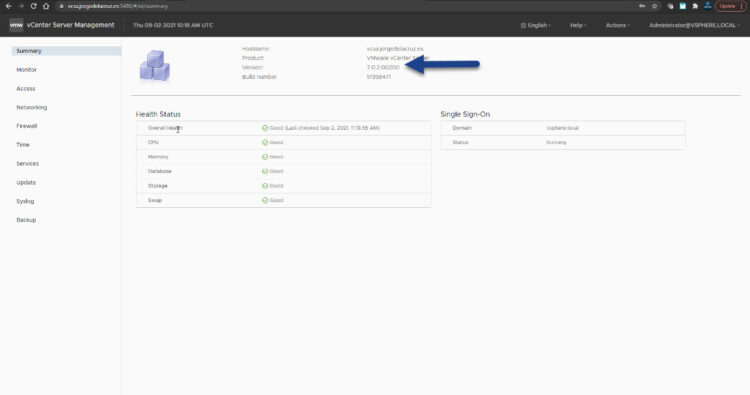
Vamos a conectarnos a nuestro VCSA actual para comprobar la versión que tenemos, en mi caso tengo 7.0 U2b, que en este caso es 7.0.2.00200:
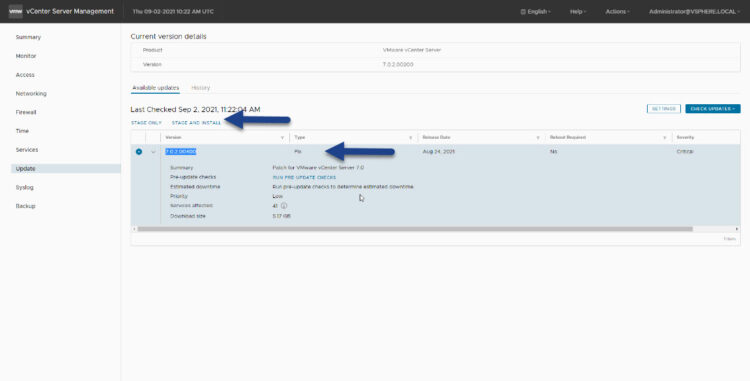
Si nos vamos hasta Update, y hacemos el típico Check Updates, veremos una nueva actualización, vSphere 7.0 Update 2c, haremos click en Stage and Install:
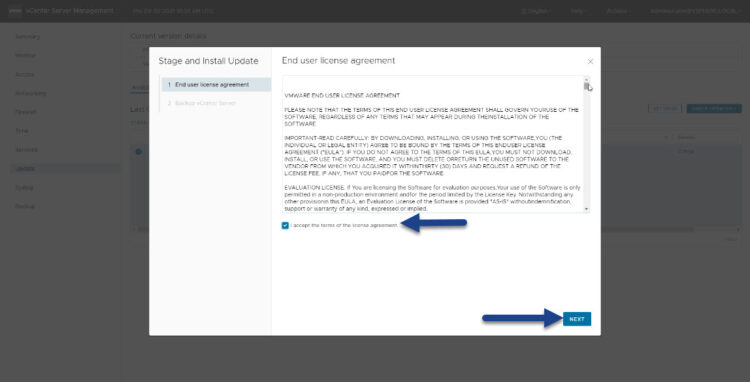
Aceptaremos la EULA como es costumbre:
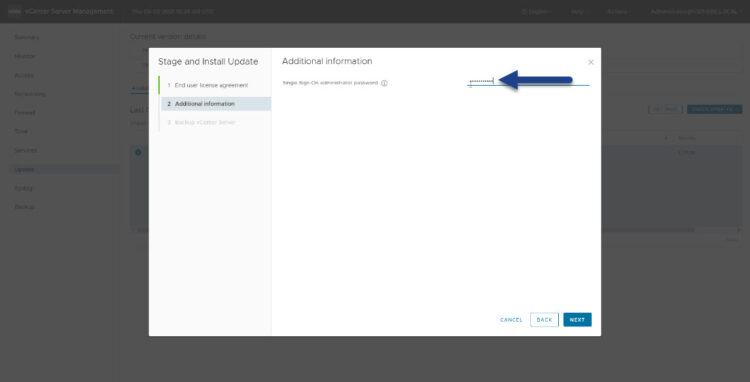
Introduciremos ahora nuestras credenciales para nuestro SSO (el vsphere.local en mi caso):
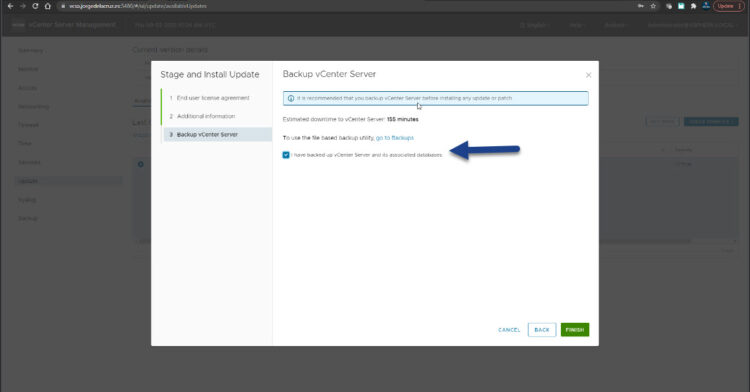
VCSA nos pregunta por si acaso, si hemos realizado un backup, o no, en mi caso he marcado que sí, porque lo hago regularmente a mi NAS:
El proceso comenzará a descargar paquetes, parar servicios e instalar los nuevos componentes, etc.: 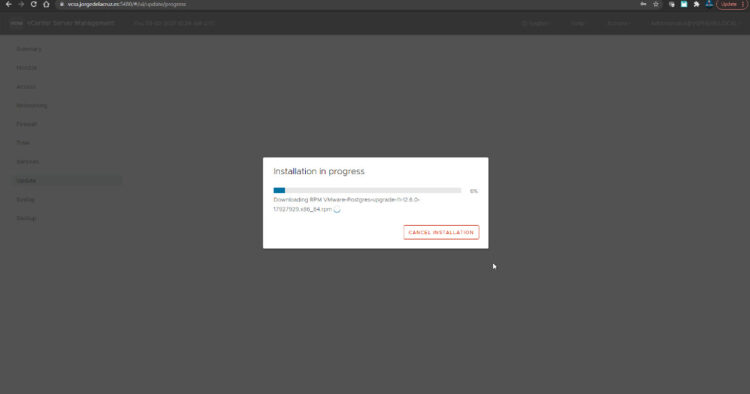
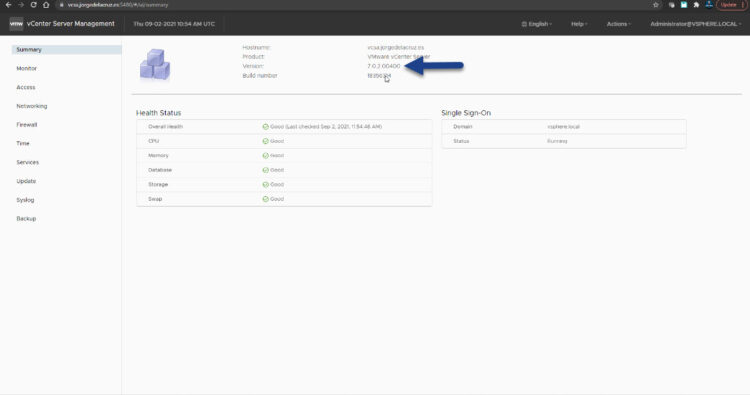
Después de unos 15-30 minutos, ya tendremos nuestro vCenter Server Appliance actualizado correctamente: 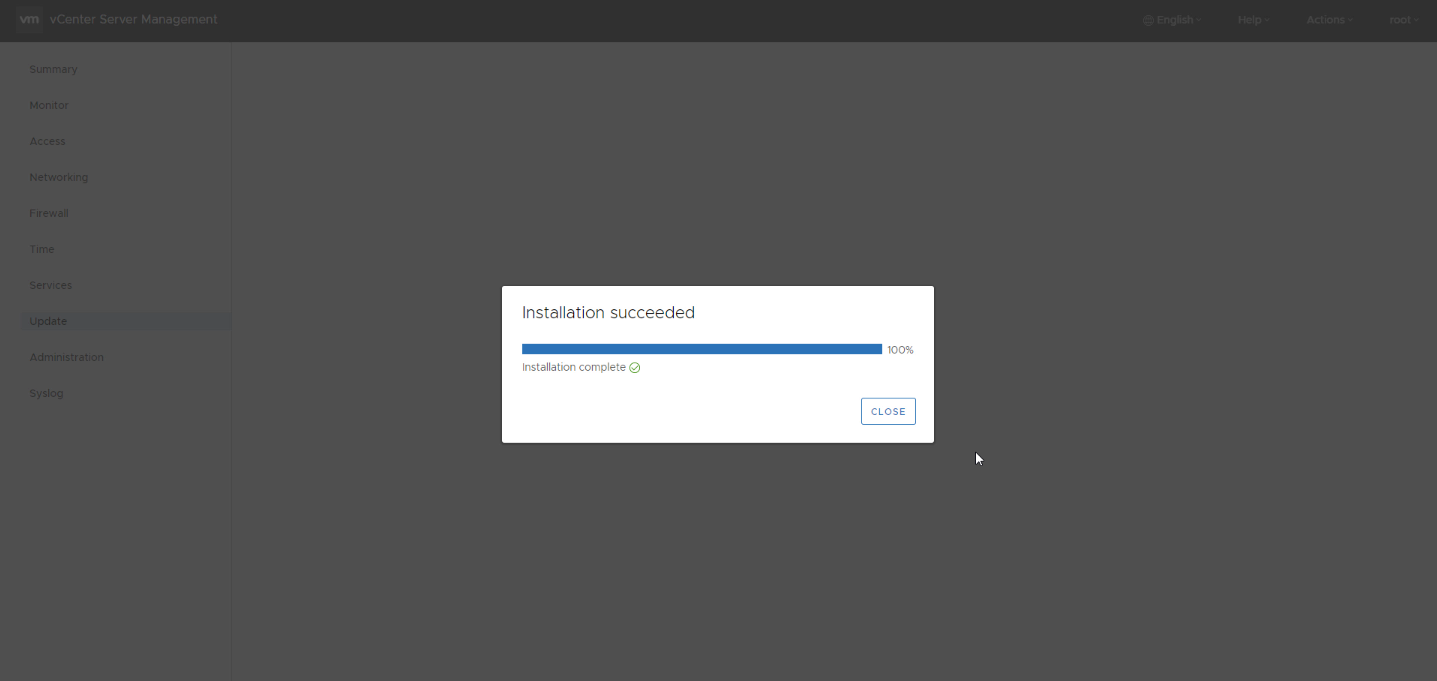 Si volvemos a la consola VAMI, al Summary, podemos ver la versión 7.0.2.00400:
Novedades frescas en vSphere 7.0 Update 2c
Este nuevo Update 2c para vSphere 7 incluye muchos bugs resueltos, algunos de los más importantes a mi parecer son:
Security Issues
- Updates to OpenSSL library
- The OpenSSL-1.1.1 library is updated to version 1.1.1k.
- The OpenSSL-1.0.2 library is updated to version 1.0.2y.
- Update to cURL
- cURL is updated to version 7.74.0.
- Update to JRE
- Oracle (Sun) JRE is updated to version 8.0.291.
- Update to the Python libraries
- The Python 3.7 library is updated to version 3.7.10.
- Update to the Spring Framework
- The Spring Framework is updated to version 5.2.13.
- Update to the Apache Tomcat server
- The Apache Tomcat server is updated to version 8.5.63.
- Responses from a remote web server on port 9087 might not have an HTTP Strict Transport Security (HSTS) response header
- Responses from a remote web server on port 9087 might lack an HSTS response header and allow unencrypted connections.
- Upgrade of Eclipse Jetty
- Eclipse Jetty is upgraded to version 9.4.39.
Security Issues
- Updates to OpenSSL library
- The OpenSSL-1.1.1 library is updated to version 1.1.1k.
- The OpenSSL-1.0.2 library is updated to version 1.0.2y.
- Update to cURL
- cURL is updated to version 7.74.0.
- Update to JRE
- Oracle (Sun) JRE is updated to version 8.0.291.
- Update to the Python libraries
- The Python 3.7 library is updated to version 3.7.10.
- Update to the Spring Framework
- The Spring Framework is updated to version 5.2.13.
- Update to the Apache Tomcat server
- The Apache Tomcat server is updated to version 8.5.63.
- Responses from a remote web server on port 9087 might not have an HTTP Strict Transport Security (HSTS) response header
- Responses from a remote web server on port 9087 might lack an HSTS response header and allow unencrypted connections.
- Upgrade of Eclipse Jetty
- Eclipse Jetty is upgraded to version 9.4.39.
Installation, Upgrade and Migration Issues
- You cannot log in to your vCenter Server system after a multi-step upgrade to vCenter Server 7.0 Update 2
- If you perform a multi-step upgrade of your vCenter Server system with an external Platform Services Controller from 5.5 to 6.0 to 6.5 to 6.7 to 7.0 Update 2, the original trusted roots might be missing from the VMware Endpoint Certificate Store (VECS) and tokens issued by the Security Token Service (STS) appear as invalid. As a result, you cannot log in to the vCenter Center system after the upgrade. In the vSphere Client, you see a message similar to
[500] An error occurred while fetching identity providers. Try again.
- If you perform a multi-step upgrade of your vCenter Server system with an external Platform Services Controller from 5.5 to 6.0 to 6.5 to 6.7 to 7.0 Update 2, the original trusted roots might be missing from the VMware Endpoint Certificate Store (VECS) and tokens issued by the Security Token Service (STS) appear as invalid. As a result, you cannot log in to the vCenter Center system after the upgrade. In the vSphere Client, you see a message similar to
- You see an unexpected error message in Update Planner
- If the PNID of the management network of your vCenter Server system contains lower and upper case characters, the Update Planner fails to fetch updates and generate interoperability reports. In the vSphere Client, you see an error such as
Unexpected error occurred while fetching the updates.
- If the PNID of the management network of your vCenter Server system contains lower and upper case characters, the Update Planner fails to fetch updates and generate interoperability reports. In the vSphere Client, you see an error such as
Guest OS Issues
- You see low-memory warnings for vCenter Server even when the system is not busy
- A kernel memory accounting issue might cause vCenter Server to consume more memory than usual, even when the system is not busy. In the vCenter Server Appliance Management Interface (VAMI) you see a warning such as
Appliance is running low on Memory. Add more memory to the machine.
- A kernel memory accounting issue might cause vCenter Server to consume more memory than usual, even when the system is not busy. In the vCenter Server Appliance Management Interface (VAMI) you see a warning such as
Novedades en Tanzu
No todo son bugs resueltos, si estáis usando Tanzu, este nuevo update trae muchas mejoras al respecto, e incluso novedades, echad un vistazo.
New Features
- Supervisor Cluster
- Supervisor Clusters Support Kubernetes 1.20 – This release adds the support of Kubernetes 1.20 and drops the support for Kubernetes 1.17. The supported versions of Kubernetes in this release are 1.20, 1.19 and 1.18. Supervisor Clusters running on Kubernetes version 1.17 will be auto-upgraded to version 1.18, to ensure all your supervisor clusters are running on the supported versions of Kubernetes.
- Velero Plugin for vSphere support for vSphere Pods – This release supports Velero 1.5.1 and the Velero Plugin for vSphere 1.1.0 and higher for backup and restore of vSphere Pods.
- Tanzu Kubernetes Grid Service for vSphere
- Harbor and external-dns as new in-cluster extensions – Platform Operators now have access to two additional supported in-cluster extensions: Harbor and external-dns. Harbor is the CNCF graduated container registry, and external-dns is a popular tool for dynamically configuring DNS records based on Kubernetes load-balanced Services.
- Improved remediation of control plane nodes – Tanzu Kubernetes clusters will now automatically remediate common control plane node failures which provides a more robust Kubernetes runtime.
- Velero Plugin for vSphere support for Tanzu Kubernetes cluster workloads – This release provides support for Velero 1.5.1 and higher and Velero Plugin for vSphere 1.1.0 and higher for backup and restore of workloads running on Tanzu Kubernetes clusters.
- Velero standalone support for Tanzu Kubernetes cluster workloads – This release provides support for Velero 1.6 for backing up and restoring Tanzu Kubernetes cluster workloads using standalone Velero with Restic.
Conclusión
Poco más que comentar de momento, en los siguientes blogs veremos más detalles sobre las novedades en Lifecycle Manager, VCSA, VSAN, y muchas cosas más.
Leave a Reply