
 Saludos amigos, VMware ha lanzado un nuevo Update para su última versión 6.7, estoy hablando del Update 3b build 15132721 Que además de contener como siempre muchas actualizaciones de seguridad, también incluye algunas novedades.
Para actualizar, vamos a parchear usando el modo interactivo usando la VAMI, como os he contado en muchas ocasiones.
Antes de actualizar, backup de la configuración de VCSA sobre vSphere 6.7
Antes de realizar ningún upgrade, aseguraros que estamos ya protegiendo nuestros VCSA 6.7, además en ésta última versión de VMware ya sabéis que se pueden programar, con lo que no hay excusas, os dejo el link para que lo veáis paso a paso:
- VMware: Programación del Backup de vCenter Server Appliance (VCSA) a un NFS o SMB – Novedad en 6.7 U2
- VMware: Programación del Backup de vCenter Server Appliance (VCSA) 6.7

Proceso de actualización a la última versión – vCenter Server 6.7 Update 3b
El proceso, que es muy sencillo y os lo he mostrado como una docena de veces, nos conectaremos a nuestra consola VAMI, que es el FQDN o IP de nuestro VCSA por el puerto 5480:
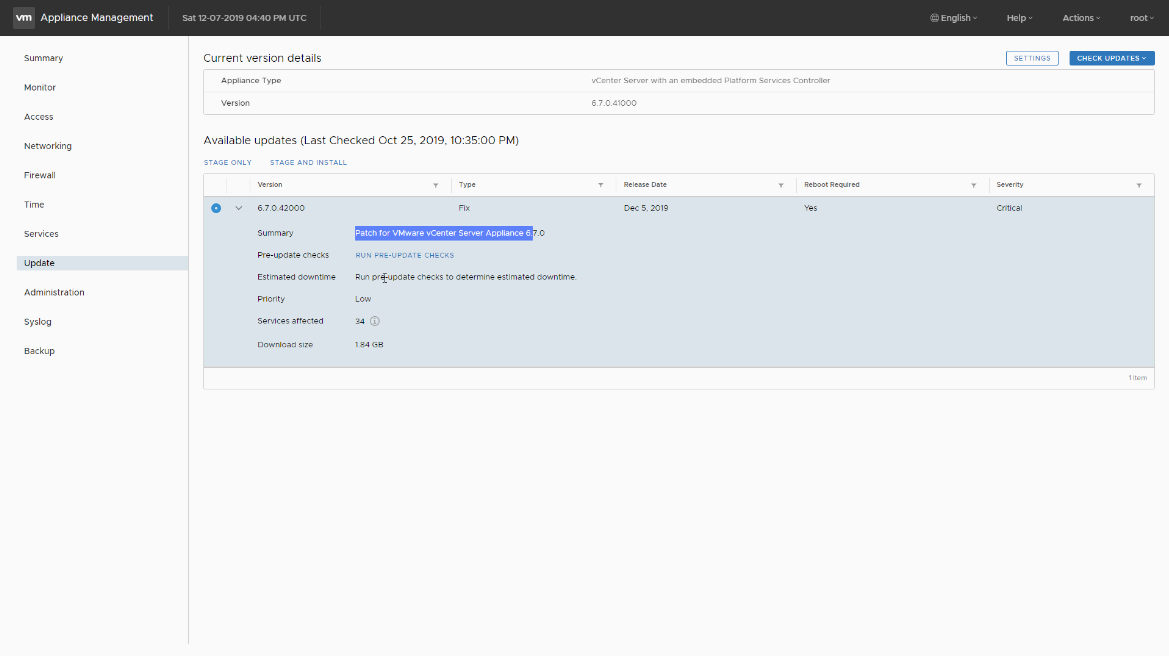
 Una vez logueados, podemos ver la versión que tenemos que en mi caso es la 6.7.0.41000 Build 14836122 que corresponde al U3a de 6.7, haremos click en Update:
 Si hacemos click en Check Updates, nos aparecerán las actualizaciones disponibles, seleccionaremos la más nueva 6.7.0.42000 nos instalará todos los parches. Haremos click en STAGE AND INSTALL:
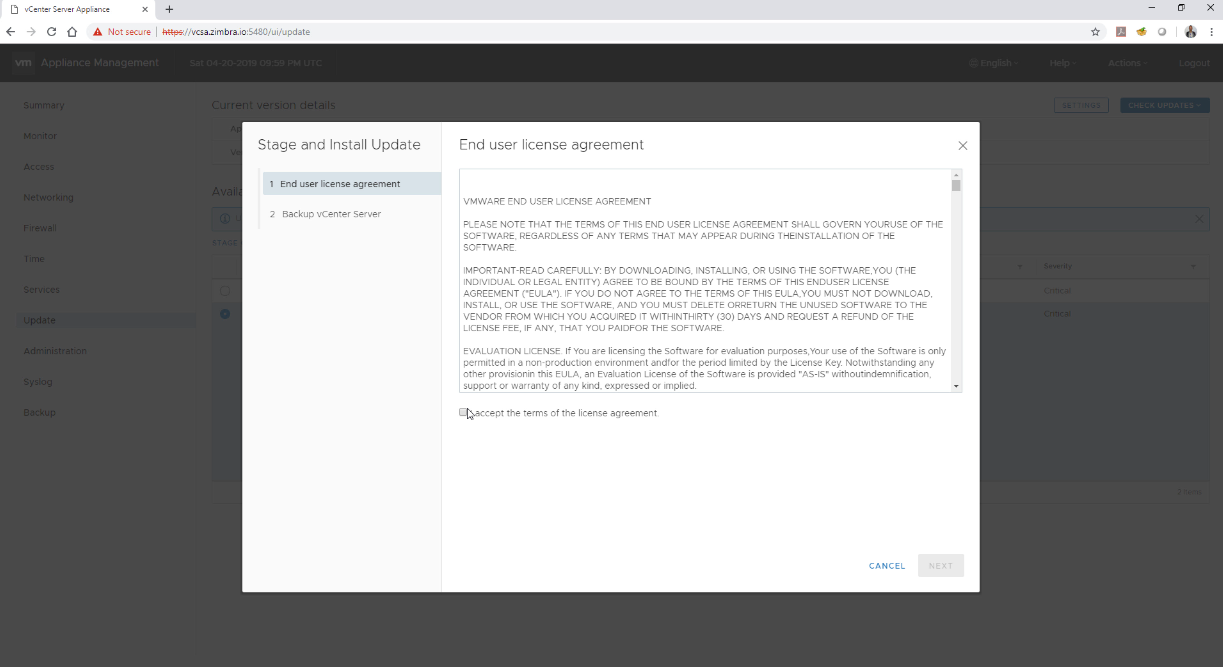
 El proceso nos pedirá aceptar la EULA:
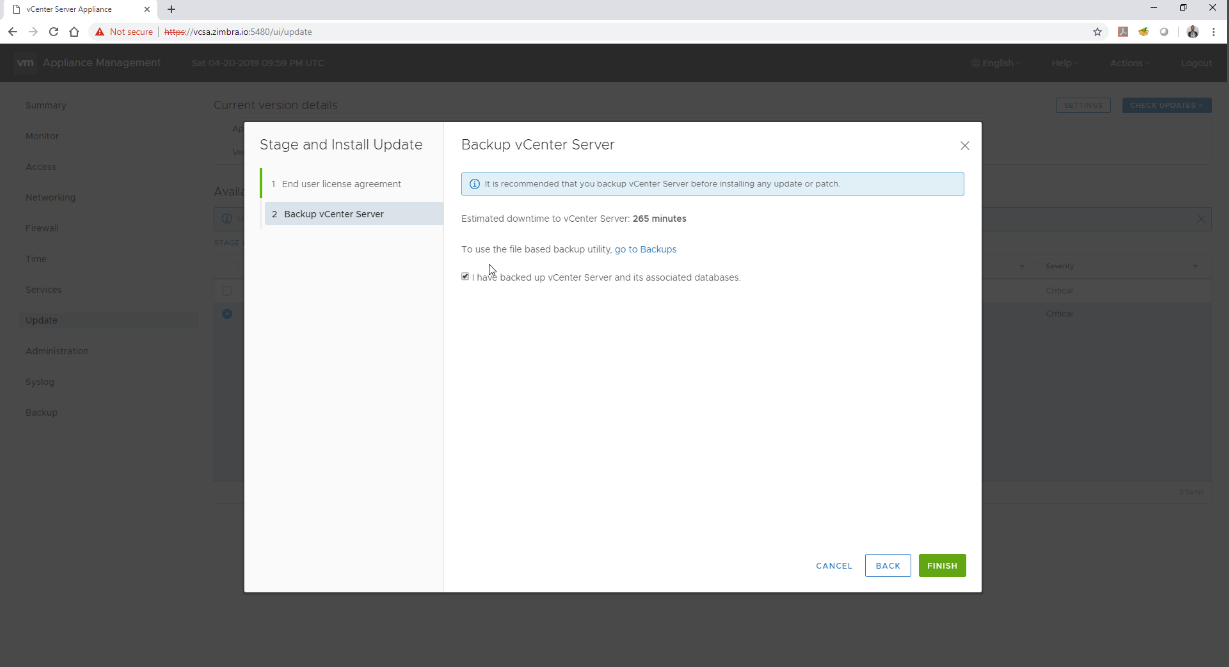
 Además de recordarnos el backup de la configuración:
 El proceso de actualización comenzará:
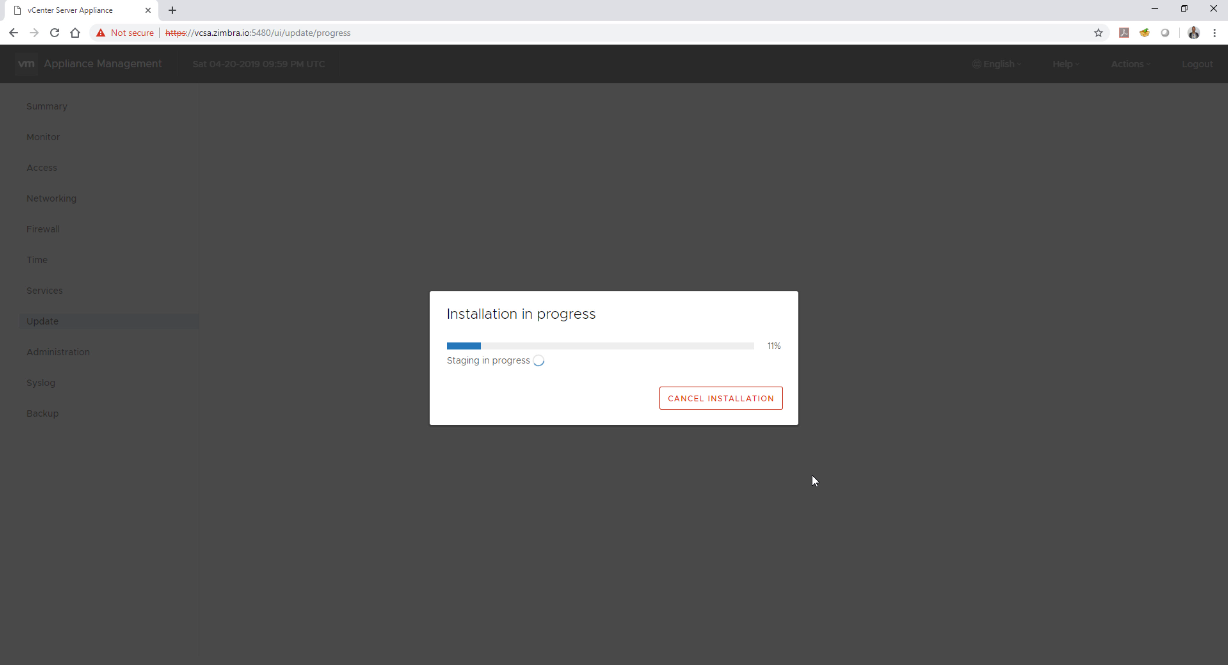 Y pasado un tiempo, en el que no tenemos que realizar nada, podremos ver que pasados unos minutos, si volvemos a conectarnos a la consola VAMI que ya tendremos la última versión: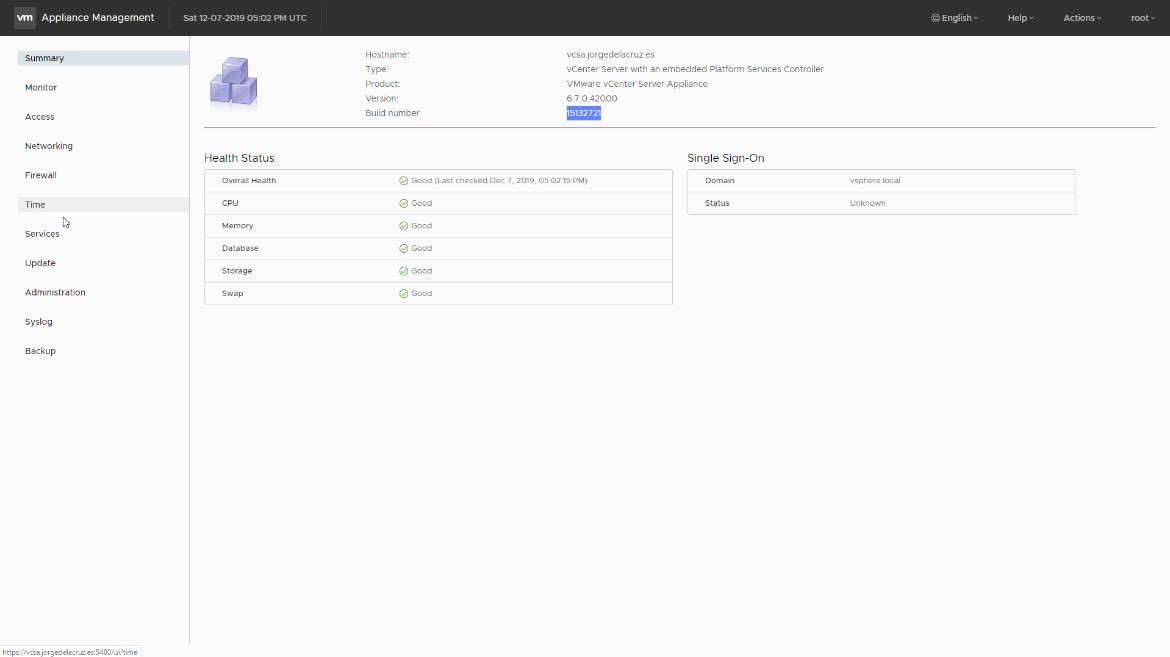
Con esto tendríamos actualizado nuestro VCSA, pero aún nos quedaría por actualizar nuestros ESXi a la última versión, pero esto lo veremos en futuras entradas.
Incidencias resueltas en vCenter 6.7 Update 3b
Se incluyen MUCHAS incidencias resueltas en vCenter 6.7 Update 3ba que pueden ser más o menos relevantes para vosotros, en mi caso la solución para CBT he visto que era muy importante. Todo lo qué es nuevo en Inglés:
Security Issues
- Update to VMware PostgresVMware Postgres is updated to version 9.6.15.
- Update of the SQLite databaseThe SQLite database is updated to version 3.29.0.
- Update to BZip2The BZip2 library is updated to version 1.0.8.
- Update to Simple Logging Facade for Java (SLF4J)The SLF4J package is updates to version 1.7.28.
- Update to JREOracle (Sun) JRE is updated to version 1.8.221.
- Update to Apache Log4j CoreThe Apache Log4j Core 2.8.x branch is updated to 2.8.2 and the 1.2.x branch to 1.2.17.
- Update to cURLcURL in the vCenter Server Appliance is updated to 7.65.3.
- Update to OpenSSLThe OpenSSL package is updated to version openssl-1.0.2s.
- Update to the Spring FrameworkThe Spring Framework is updated to version 4.3.25.
- Update to the Apache TomcatThe Apache Tomcat is updated to version 8.5.45.
- Upgrade of Eclipse JettyEclipse Jetty is upgraded to version 9.4.20.
- Update to Apache Commons collectionsApache Commons collections is updated to version 3.2.2.
- Update to the Expat XML parserThe Expat XML parser is updated to version 2.2.7.
- You might see a vector::reserve error when deploying virtual machines from templates and the vpxd service might failYour vCenter Server system reports an error similar to:
A general system error occurred, vector::reservewhen you try to deploy a virtual machine from a template. When a virtual machine reconfiguration task that connects a vNIC to a distributed portgroup accidentally triggers the Auto Expand feature, if a portgroup is removed at the same time, the port number of the virtual switch might be wrongly updated. This causes the vpxd service to fail.This issue is resolved in this release. - You cannot find opaque networks in the Ovf Enivornment xmlYou cannot find opaque networks in the AdapterSection of the Ovf Enivornment xml of a virtual machine in either the vSphere Web Client or vSphere Client.This issue is resolved in this release. The fix adds the list of opaque networks to the AdapterSection section of the Ovf Enivornment xml.
- You might see duplicate IP addresses in the vSphere ClientAfter a restart of the vCenter Server daemon, vpxd, for virtual machines with multiple NICs, you might see duplicate IP addresses in the vSphere Client. This is because a reference table in the vCenter Server database does not update correctly.This issue is resolved in this release.
- vCenter Server stops responding and the vpxd service continuously fails at VMware vSphere Storage DRS recommendationsThis problem might occur when the system files of a virtual machine are located in one datastore and the working directory is located on another datastore. If such a virtual machine has an ISO image mounted from a datastore in the same cluster as its virtual disk, the vpxd service might fail while checking affinity rule violations for the DrmDisks.This issue is resolved in this release.
- Backups scheduled by using the vCenter Server Appliance Management Interface do not delete old backups according to retention policy on SMB and NFS sharesIf you schedule backups on SMB or NFS shared storage by using the vCenter Server Appliance Management Interface, old backups might not be removed according to the set retention policy.This issue is fixed in this release.
- Multiple static routes defined for eth0 cause file-based backup to failWhen eth0 is configured with multiple static routes, file-based backup by using the vCenter Server Appliance Management Interface fails. You can see error messages similar to
ERROR: BackupManager encountered an.This issue is resolved in this release. However, route configurations in
exception: While reading from '/etc/systemd/network/10-eth0.network'
[line 15]: section 'Route' already exists/etc/systemd/network/10-eth0.networkmight be lost after a restore and you must reconfigure eth0.
Installation, Upgrade, and Migration Issues
- You cannot run certificate-related API calls after an update from vCenter Server 6.7 Update 2 to 6.7 Update 2a or 6.7 Update 2cAfter an update from vCenter Server 6.7 Update 2 to 6.7 Update 2a or 6.7 Update 2c, if you run a certificate-related API call, you get errors similar to
Cannot find service com.vmware.vcenter.certificate_management.vcenterorcom.vmware.vapi.std.errors.operation_not_found, orvapi.method.input.invalid.interface.This issue is resolved in this release. - vCenter Server upgrades might fail due to Windows Authenticator error vCenter Server upgrades might fail with an error similar to
Upgrade Phase 'vcdb:Export' failed. Exception: None is not a valid string in this context. If you use Windows Authenticator, parameters such asvcSvcUsername,vcSvcDomainandvcSvcPasswordmight be passed blank and cause the authentication error.This issue is resolved in this release. - vCenter Server upgrade to 6.7.x might fail while starting the Content Library service vCenter Server upgrade to 6.7.x might fail if a Content Library administrator user role is not present.This issue is resolved in this release.
- Patching vCenter Server 6.7.x with vCenter Server High Availability enabled might failPatching a vCenter Server system with vCenter Server High Availability enabled to a later version of 6.7.x might fail. Patching works only if you remove the vCenter Server High Availability cluster configuration, patch the vCenter Server system, and then reconfigure vCenter Server High Availability.This issue is resolved in this release. For more information, see VMware knowledge base article 55938.
vCenter Server, vSphere Web Client, and vSphere Client Issues
- VMware vSphere Storage DRS system calculations for space utilization might override user-defined settingsYou might see vSphere Storage DRS working with space utilization different from what you have defined as parameters. For instance, if you set 100 GB as minimum level of consumed space for each datastore, the system might use a threshold of 90%. This is due to an algorithm that constantly uses datastore space utilization as a metric to schedule vSphere Storage DRS. The algorithm uses a percentage of utilization instead of using the hard-set threshold.This issue is resolved in this release. The fix aligns the algorithm with the user-defined parameters for space utilization.
- vSAN UI does not appear in vSphere Client after upgrade to 6.7 Update 3If your vCenter Server system was originally at version 5.5 or earlier, the server UUID is in uppercase. The upgrade to 6.7 Update 3 causes a problem that blocks the vSAN UI from appearing in the vSphere Client.
You might see a similar message in the vSphere Client log file:
Caused by: com.vmware.vsphere.client.vsandp.core.sessionmanager.common.NotAuthenticatedException:

Authentication information for the specified site is missing. Authenticate with the site and try again.

at com.vmware.vsphere.client.vsandp.core.sessionmanager.common.VcClient.getConnection

Caused by:

com.vmware.vsphere.client.vsandp.core.sessionmanager.vlsi.client.sso.tokenstore.NoTokenException:

No token for site: 3D428B1A-E589-47EB-BB83-B7D8A32A97E8
A related issue occurs because vSAN used a legacy endpoint to connect to the vCenter Single Sign-On administration service, which causes the following error to appear:Certificate chain not trusted.These issues are resolved in this release. - Cannot enable vSAN performance service in vSphere ClientWhen you enable the vSAN performance service in the vSphere Client, the operation might time out after 30 seconds. The following error message is displayed:
java.net.SocketTimeoutException: Read timed out.This issue is resolved in this release.
- Converging a vCenter Server instance with an external Platform Services Controller to a vCenter Server instance with an embedded Platform Services Controller fails with an STS system tenant errorConverging a vCenter Server instance with an external Platform Services Controller to a vCenter Server instance with an embedded Platform Services Controller by using the vSphere Client might fail with an error similar to
Failed to set up STS system tenant. The failure happens during firstboot.This issue is resolved in this release. - Convergence of a vCenter Server Appliance with an external Platform Services Controller to a vCenter Server Appliance with an embedded Platform Services Controller connected in Embedded Linked Mode fails after the first node is convergedConverging instances of vCenter Server Appliance with an external Platform Services Controller into vCenter Server Appliance with an embedded Platform Services Controller connected in Embedded Linked Mode might fail after the first node is converged, because during the convergence the VMware Directory Service (vmdir) is set in standalone mode. As a result, the convergence of the subsequent vCenter Server nodes fails.This issue is resolved in this release. For more details, see VMware knowledge base article 71391.
Virtual Machine Management Issues
- A scheduled task to take snapshots of multiple virtual machines might start immediately instead of at the scheduled timeWhen you schedule a task to take snapshots of multiple virtual machines, the task starts immediately instead of at the scheduled time.This issue is resolved in this release.
- If a vCenter Server system is joined to a child Active Directory domain and has added it as a vCenter Single Sign-On identity source, you cannot reconfigure it by using the CLI sso-config utilityWhen a vCenter Server system is joined to a child Active Directory domain and has added it as an identity source, you cannot use the CLI
sso-configutility to reconfigure that identity source, such as for smart card authentication. Thesso-configutility might return null even if the identity source exists.This issue is resolved in this release.
- Authenticating Active Directory users by using SmartCard or eToken fails with a permission errorIn the vSphere Web Client or vSphere Client, you might see a permission error when authenticating Active Directory users by using SmartCard or eToken, because if configured with Integrated Windows Authentication (IWA), group information of the trusted domains might be missing. This issue happens when the contacted Domain Controller is not a Global Catalog.This issue is resolved in this release. The fix provides the option to force queries of Global Catalog–enabled Domain Controllers first.
To set the option, use the following commands:
# /opt/likewise/bin/lwregshell set_value '[HKEY_THIS_MACHINE\Services\netlogon\Parameters]' QueryGlobalCatalogEnable 1To revert to the default settings, use the following commands:
# /opt/likewise/bin/lwsm restart lwreg
# /opt/likewise/bin/lwregshell set_value '[HKEY_THIS_MACHINE\Services\netlogon\Parameters]' QueryGlobalCatalogEnable 0

# /opt/likewise/bin/lwsm restart lwreg - Active Directory authentication or joining a domain is slowActive Directory authentication or joining a domain might be slow when configured with Integrated Windows Authentication (IWA), because of infrastructure issues such as network latency and firewalls in some of the domain controllers.This issue is resolved in this release. The fix provides the option to blacklist selected domain controllers in case of infrastructure issues.To set the option, use the following commands:
# /opt/likewise/bin/lwregshell set_value '[HKEY_THIS_MACHINE\Services\netlogon\Parameters]' BlacklistedDCs DC_IP1,DC_IP2,...To revert to the default settings, use the following commands:
# /opt/likewise/bin/lwsm restart lwreg
# /opt/likewise/bin/lwregshell set_value '[HKEY_THIS_MACHINE\Services\netlogon\Parameters]' BlacklistedDCs ""

# /opt/likewise/bin/lwsm restart lwreg - Users cannot log in to a vCenter Server system due to a domain offline issueOn request by the VMware Identity Manager, the Likewise Service Manager daemon provides a list of service identification numbers. During the resolution of the entries in this list, if a respective domain is temporarily offline, the operation stops. As a result, some service identification numbers remain unresolved and users from any of the other domains cannot log in to the vCenter Server system.This issue is resolved in this release. The fix introduces an error message log for offline domains but enables the operation to continue and complete the resolution of all available domains. In the Likewise Service Manager log, you can see the domain offline errors.
- After a change in the host name or FQDN, virtual machines guest OS customization might failAfter a change in the hostname or FQDN of a vCenter Server, the guest OS customization of virtual machines might fail. The data-encipherment certificate is not replaced during a host name or FQDN change, which causes the issue.This issue is resolved in this release.
- After migration of virtual machines by using vSphere Storage vMotion, the VM Summary tab might not display the updated storage usage fieldWhen changing datastores, the disk space used could change if the storage policy or thin provisioning values are different. After migration of virtual machines by using Storage vMotion, the VM Summary tab in either the vSphere Web Client or vSphere Client might not display the updated storage usage field.This issue is resolved in this release.
- Duplicate DNS records after configuring a vCenter Server High Availability environment might interrupt access to the vCenter Server systemAfter configuring or patching a vCenter Server High Availability environment followed by a failover, access to the vCenter Server system might be blocked due to duplicate DNS records for the vCenter Sever Appliance.This issue is resolved in this release. Before patching vCenter Server High Availability environments, clean up duplicate DNS records by following the steps described in VMware knowledge base article 76406.
Conclusión
Poco más que mencionar sobre esta actualización que no encontréis en los siguientes blogs, yo la recomiendo como siempre, ya que estar actualizado a la última versión es realmente importante, os dejo algunas entradas extra sobre VMware vCenter Server Appliance para Linux:
- VMware: Aumentar el número de intentos de login y reducir el tiempo de lockout para root en VCSA 6.5
- VMware: Cómo desplegar VMware VCSA 6.5.x en VMware Fusion 10
- VMware: Cómo solucionar el error en VCSA – Account locked due to x failed logins
- VMware: Monitorizando VCSA 6.5 usando SNMP y PRTG Network Monitor
- VMware: Cómo resetar la password de root de VCSA 6.5 en 60 segundos
Además mencionar que Veeam soporta de manera completa vSphere 6.7 Update 3 si estamos usando Veeam Backup & Replication v9.5 U4b.
Leave a Reply