
 Saludos amigos, ya os he hablado en el pasado sobre este fantástico Fling, que además se convirtió en oficial desde VMware vSphere 6.5.
VMware lanzaba hace unos días una nueva actualización después de varios meses, y nos trae muchas, muchas novedades, vamos a ver el proceso de actualización.
¿Cómo actualizar a la nueva versión?
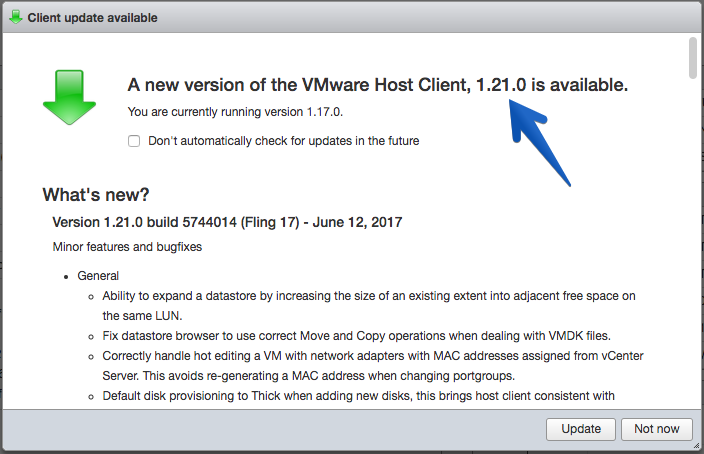
Lo más cómodo es abrir nuestro Host Client y aceptar el auto-update que nos muestra, de la siguiente manera:
Comprobaremos a la versión que queremos ir, y la versión que tenemos disponible y haremos click en Update
 Automáticamente nos rellenará la URL con el último .vib disponible para nuestro ESXi, haremos click en Update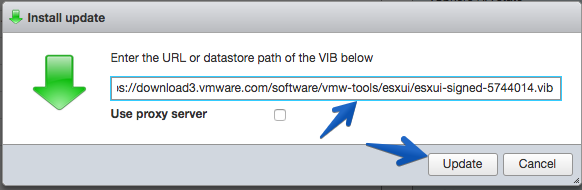
El proceso comenzará y veremos como nuestro ESXi empieza a actualizarse
Una vez termina, vemos que no ha habido ningún error
Ya podremos hacer logout, y login, irnos a Help – About y ver que disponemos de la nueva versión.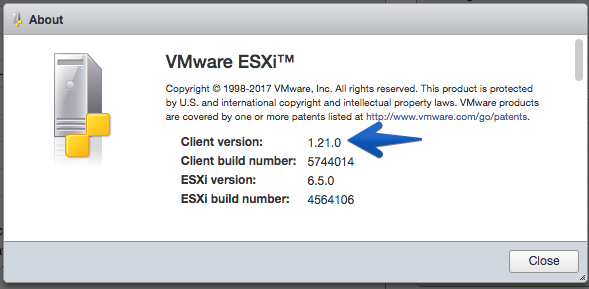
Actualizar usando SSH
Si de todas formas queréis actualizar de manera manual, podéis seguir estos pasos desde la consola de ESXi:
esxcli software vib install -v https://download3.vmware.com/software/vmw-tools/esxui/esxui-signed-5744014.vib
Novedades en la versión 1.21.0 build 5744014 (Fling 17)
Minor features and bugfixes
- General
- Ability to expand a datastore by increasing the size of an existing extent into adjacent free space on the same LUN.
- Fix datastore browser to use correct Move and Copy operations when dealing with VMDK files.
- Correctly handle hot editing a VM with network adapters with MAC addresses assigned from vCenter Server. This avoids re-generating a MAC address when changing portgroups.
- Default disk provisioning to Thick when adding new disks, this brings host client consistent with vCenter Server.
- Handle missing certificate data in Host -> Manage -> Security -> Certificates.
- Show link speed and status in vSwitch edit/add dialog.
- Move VM name to beginning of page title in full console windows and tabs.
- Slight adjustment to resolution change size when fitting VM remote console to window to avoid a resolution change event on initial load.
- Override firefox input:disabled background color to make text in disabled inputs more readable.
- Let hostd determine the filename of newly created disks.
- Don’t restrict the number of disks a VM can have.
- Prevent regex replace of undefined ova property description.
- Add support for adding group permissions.
- Address an issue where new VM disks are not stored on the correct datastore.
Links Interesantes
Estos links tienen todos que ver con VMware Host Client y seguro que os gusta su lectura:
- VMware: ESXi Embedded Host Client, UI basada en HTML 5 para nuestros ESXi
- VMware ESXi Embedded Host Client es ahora VMware Host Client
- VMware: ESXi Host Embedded Client llega a su versión 1.5.0 (build 3976049 – Fling 9)
- VMware: Actualizando ESXi Host Embedded Client de manera automática v1.7.0 build 4186463 (Fling 10)
- VMware: Host Client Fling 11, v1.8.1 build 4355717 ¡Incluye soporte para Google Chrome SSH!
- VMware: Actualizar a vCenter vSphere 6.0 U2 usando el nuevo VMware Host Client
Leave a Reply